
SnootySims

Become The Master Of Time With These Simple Sims 4 Time Cheats And Hacks

Photo of author
Author: Jovanna

Have you ever wished you could just skip boring parts of the day in Sims 4? Well, with time cheats, that’s more than possible! Read on to discover what these helpful cheats can do and how to use them in your gameplay!
time cheat
Become The Master Of Time With These Simple Sims 4 Time Cheats And Hacks!

350 CC Items! Time to celebrate! 🎉

Before we begin: Thank you! We’re celebrating 3 years and 350+ CC items. As a gift, supporters can get all our free CC at once here: ALL IN ONE DOWNLOAD

How time works in Sims?

If you are already familiar with how Sims 4 works, you have likely noticed that, besides the pause button, there are three time speeds in the game: normal, fast, and ultra-speed. You can use them almost any time to control how fast or slow the time passes by.

If we could translate Sims minutes to our minutes, 1 minute of real time equals 1 second of Sims 4 gameplay. So, if you play at normal speed, one day in Sims 4 will last 24 minutes, and whole Sims week can pass for 2.8 hours of your gameplay. Seasons last 7 days, which means one Sims 4 year typically lasts 28 Sims days.

And while you are free to play with time speed buttons, there isn’t much you can do to slow down your game, make days last longer, instantly skip times of the day, or speed up the game even more. This is where time cheats and mods can come to the rescue! Let’s see how they can help you and how to activate them.

Sims 4 Time Cheat: The Easy Way to Control Time in Your Game

With those three time speeds, we have full control of how fast we want the time to pass by in Sims 4. After all, it would be a real waste of time watching a Sim from one-Sim household sleep or read a book, right?

But, we can all agree that it would be even cooler if we could simply change hours on our Sims 4 clock with precision or play in slow mode. While there is no way we can achieve this organically in the game, there is a roundabout way to become the master of time and control clocks in our favorite game – using time cheats and mods. Let’s see how you can become the most time-efficient Simmer ever. But first, let’s enable cheats.

Read on SNOOTYSIMS: Harnessing time with the Sims 4 age up cheat!

agecheatsimsnsnootysims 1

How to enable cheats in Sims 4?

To enjoy the benefits of using cheats in Sims 4, we first need to enable them in our game. Cheats can be activated only when you are in the game and playing a household. Once you start playing, press CTRL+SHIFT+C at the same time, and this will open a cheat bar in the upper left corner of your screen. Type testingcheats true (or, testingcheats on) and press Enter. You will be notified that cheats are successfully enabled, which means you can now start using all Sims 4 cheats, including the time cheat!

To open a cheat bar on Mac, press COMMAND+SHIFT+C, and if you play on PlayStation or Xbox, just simultaneously hit all bumpers and the cheat bar will pop up immediately.

Now, let’s see how the time cheat works and how to activate it!

How to slow down time with cheats?

If you’d like to slow down time using time cheats, the cheat you’ll want to try out is clock. _set_milliseconds_per_sim_second XX. The XX stands for a numerical value that allows you to determine how slow you want your game to progress.

Try with smaller values, from 30 to 50, and monitor the clock to see how the code works for you. Some simmers suggest using the clock. _set_milliseconds_per_sim_second 1000 cheat to make Sim day match in real-time, but this is a risky move, as it may make your game crash or cause gameplay issues.

How to use the time cheat in Sims 4 to skip hours?

There is also a time cheat designed to help you skip hours. This one doesn’t affect time speeds, and won’t speed up your game the way it’s usually done by using speed I, II, or III. Instad, it helps you swiftly shift from one time of the day to another, just by entering the exact hour and minute you want to time-travel to. Here is what you need to do to make this work for you:

  • Open the cheat bar as described above
  • Type clock.advance_game_time X in the cheat bar. The ‘’X’’ in the cheat stands for hours and minutes and needs to be replaced with the exact time. For instance, if you’d like to skip from 6 AM to 11 AM, just type clock.advance_game_time 5 00. Hit Enter to confirm and the clock in your game should now show 11 AM. This time cheat should change what your clock is showing.

Can you go back in time or skip entire days?

If you want to travel back in time, just type clock.advance_game_time -X. Like with traveling to the future, replace the -X in the time cheat with a negative numerical value representing hours and minutes. So, if you want to travel 4 and 50 back into the past, just type clock.advance_game_time -4 50, and the time should immediately change, and so may your Sim’s needs and mood.

You can also use it to skip entire days. For instance, if you want to skip 4 days, you can do so by typing clock.advance_game_time 96, and the game will instantly take you into the future. Using this method, you can skip entire days of the week. 

How will time cheats impact gameplay?

Time cheats, especially those that skip hours, are a controversial topic in the Sims 4 community, and while some report they cause issues, many other simmers can’t use them at all. There are also some who report such cheat work, but may freeze the Sim or cause havoc in their gameplay.

The time cheat won’t just reset your clock. Simmers have reported that the reset will impact not only your Sim and their needs but also everyone else in the game. Their task time will also remain the same, so they risk skipping their job or school. Life in the game will continue as ordinary, and autonomous events will happen in the time frame you’ve skipped using the time cheat. If you have elders or old pets, they may die, and unforeseen events may occur that will impact your gameplay going forward. This can even cause trouble with loading the game later.

The best you can do is try them out and use small numerical values to see how and if they work. If not, we have prepared some trusted time-control alternatives – mods.

Cheats are not working? Check out possible reasons why here.

how to reverse time on your Sims without drastic gameplay changes?

If your sole goal for using the time cheat is to age up or reverse aging on your Sims, there is another, much better way to do it. Simply type cas.fulleditmode in the cheat bar, and hit Enter. Then, press SHIFT+click on your Sim, choose Modify in CAS, and change your Sim’s age in the age panel in CAS. You can use this method to make them as young or as old as you like. This won’t trigger unwanted events, and your game will remain pretty much intact. The only thing that will change is your Sim’s age. This cheat works every time.

Change time with these Handy mods!

If you don’t want to use time cheats and risk having unforeseen events mess up your game, or would like to gain more control over how fast or slow time passes, you can try out time mods. In fact, there are a few mods that tweak time or help you better control it. Here are some:

MCCC by Deaderpool
image

This is probably the most trusted way to manipulate time in Sims 4. If you feel like time flies too fast in Sims 4 and you just wish a day would last longer, you can make it last longer by using MCCC mod. It will slow down time beyond game limits, so that you can fully cherish every day playing your favorite households.

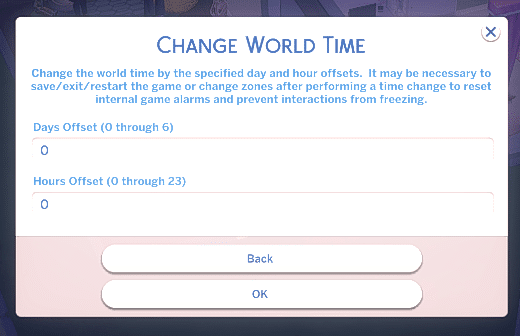
You’ll find the time cheat option under Change World Time in MCCC cheats, where you can change days or hours by typing numerical values. For instance, to skip from 1 AM to 6 AM, just type 5 in the Hours Offset bar and confirm with OK button. Or, to change days, just type any number from 0 to 6, and you’ll time travel immediately.

This is an extensive mod, so you’ll get so much more than just time control. To download it, go here! Learn more about how it works here.

OTHER USEFUL TIME MODS

  • SuperSpeed Mod by SrslySims – Unlike its older brother, The Sims 3, Sims 4 doesn’t feature the fourth gameplay time speed. This mod will make the fastest speed in the game even more efficient, as it modifies the ultra speed in the game. It allows you to use it as usual, or, if you click twice on the 3rd speed icon, to speed up time passing even more. You can download it here.
  • Control Menu Mod by ColonolNutty – Among other things, such as setting carers or friendships for your Sims, this mod also allows you to control time and change time speed, so you can have your game run in slow motion or super fast. To get it, go here!

Conclusion

So, this was how you travel through time using cheats and mods. Use them mindfully or get as hectic as you like, because time travel can come with some consequences. The best way to benefit from them is to stick to changing small time frames to avoid unpleasant surprises in the future. Try it out for yourself and see if it works, and happy simming!

related content

VISIT THE MAIN PAGE: SIMS 4 CHEATS LISTED (2023): ALL CODES FOR PC, MAC, PS4 & XBOX THE SIMS 4 ENERGY CHEAT + NEED CHEATS! THE SIMS 4 MOVE OBJECTS CHEAT: NO BUILD LIMITS (FULL GUIDE 2023) USING RELATIONSHIP CHEATS TO BECOME A MASTER SIM-MANIPULATOR (2023) HOW TO HAVE TWINS IN THE SIMS 4 | THE TWINS CHEAT | FULL GUIDE 2023


Follow SnootySims on Social Media:

Join us on our journey to discover the latest and finest Sims 4 custom content, as well as stay updated on news and rumors surrounding the highly anticipated Sims 5! 🌟

Our Latest Custom Content @ Patreon


Latest CC Finds @ SnootySims


FOR SIMS FANS, WITH LOVE ♥

We're on Patreon, too!

We've now shared 350+ CC packs on our Patreon. Find your next favorites — made with love for your Sims. ♥

Supporters also get a handy one-click download.

Discover our Patreon
FEATURED SIMS 4 CC · AMARA

A little Nordic warmth. 💚

Meet the NORDLYS Set: cozy furniture, soft textures and warm neutrals for your Sims’ homes.

Explore on Patreon Availability and download details on the creator’s Patreon.
SNOOTYSIMS

Privacy Policy

SNOOTYSIMS

Privacy Policy

Effective Date: October 2, 2026
Last Updated: October 14, 2026

1. Introduction

This Privacy Policy explains how SnootySims (SnootySims.com, the “Site,” “we,” “us,” or “our”) collects, uses and discloses personal information when you visit the Site, create an account, subscribe to emails or contact us. It also explains your privacy choices.

2. Information We Collect

We collect information you provide through account features, subscriptions and support requests. This may include your email address, display name, profile photo, preferences and the contents of your messages. Please do not send information that is not needed for your request.

Our Site and service providers may automatically receive your IP address, browser and device information, operating system, referring page, access times, pages viewed, searches, link or ad interactions, and cookie or device identifiers. An IP address may be used to infer approximate location. Advertising partners may derive interests or audience segments from browsing activity.

3. Account Information

We use Clerk for account creation, email/password authentication, sessions, account recovery and security. Account data may include your email address, internal account ID, display name, profile photo, account settings, authentication and password-reset information. If you choose Google sign-in, we receive the information you authorize Google to share.

We use this information to provide account features, recover access, respond to support requests and prevent fraud or abuse. If you use My collection, we store the CC items you save and your 20 most recent distinct searches with your account. You can remove favorites and clear your search history in My collection. These lists are private and are not published to other users. You can contact us to request deletion of all associated records. Account registration does not automatically enroll you in marketing emails.

4. Newsletter and EmailOctopus

If you separately subscribe, we may send newsletters, new Sims content, site updates and occasional promotional emails. Subscription is optional and is not required to create an account. Essential account, security and service emails are separate from marketing.

We use EmailOctopus to manage newsletters, with Amazon SES for delivery through EmailOctopus Connect. Subscriber information may include your email address, optional name, consent and subscription status, signup source and time, confirmation records, unsubscribe status, delivery information and technical information needed to send emails.

Where campaign tracking is enabled with any required consent, EmailOctopus may record email opens through tracking pixels and link clicks to help measure campaign performance. See the EmailOctopus Privacy Policy.

You can unsubscribe using the link in any marketing email or by contacting snooty@snootysims.com. We may keep limited suppression records to avoid sending further marketing or accidentally resubscribing you. Unsubscribing does not stop essential, non-promotional account or service messages.

5. How We Use Information

We use information to operate SnootySims, provide and secure accounts, recover access, answer requests, send subscribed communications, improve content and performance, understand site use, prevent fraud, meet legal obligations, and deliver and measure advertising, including personalized advertising where applicable.

6. Cookies and Similar Technologies

We and our providers may use cookies, local storage, pixels and similar technologies for sessions, security, preferences, analytics, advertising and ad measurement. For example, browser storage remembers site preferences and guest usage limits.

You can manage cookies through your browser and use privacy controls available on the Site. Blocking storage may affect account features or preferences. Raptive advertising controls apply to Raptive ads; they do not necessarily control every other service on the Site.

7. Analytics and Google Services

The Site uses Google Tag Manager to load configured tags. Where Google Analytics is enabled, it may process device and browser information, page views, referrals, session activity, approximate location and cookies or similar identifiers to help us understand site use and improve content. Google also processes information when you choose Google sign-in. See the Google Privacy Policy.

8. Advertising and Raptive

Advertising.

CMI Marketing, Inc., d/b/a Raptive (“Raptive”) is a service provider of this Site for the purposes of placing advertising on the Site, and Raptive will collect and use certain data for advertising purposes. To learn more about Raptive’s data usage, click here: Raptive Advertising Privacy Statement

Raptive and its partners may use cookies, device identifiers, IP addresses, browser information, browsing and ad activity, approximate location and inferred interests for personalized ads, measurement, analytics and fraud prevention. These disclosures may qualify as a “sale,” “sharing,” or “targeted advertising” under state privacy laws, even without exchanging a customer database for money.

9. Advertising Privacy Choices

For US visitors, Raptive supplies a “Do Not Sell or Share My Personal Information” control through its ad code, ordinarily at the bottom of the homepage or the first ad-supported page you visit. Use that control to manage Raptive advertising choices. If it is unavailable, contact us. Opting out does not remove all ads; contextual or non-personalized ads may still appear.

Browser-based choices may need to be repeated on other browsers or devices or after clearing cookies.

10. How We Disclose Information

Information may be disclosed to hosting, infrastructure, authentication, email, analytics and security providers to operate the Site; to Raptive and advertising partners for the purposes described above; when required by law or necessary to protect rights and security; and to parties involved in a merger, acquisition, financing or sale of business assets, subject to applicable law. Providers may process information outside your state or country, including in the United States.

11. US State Privacy Rights

Depending on your state of residence and whether the applicable law applies to SnootySims, you may have rights to confirm processing, access, correct or delete information, obtain a portable copy, and opt out of sale, sharing, targeted advertising or certain profiling. Where applicable, you may limit certain sensitive-information uses and appeal a denied request. We will not unlawfully discriminate against you for exercising these rights.

12. California Privacy Notice

This section applies to the extent SnootySims is subject to the California Consumer Privacy Act, as amended.

  • Identifiers: email addresses, IP addresses, account IDs and cookie or device identifiers.
  • Account information: profile details, preferences and authentication information, as applicable.
  • Internet activity: pages viewed, searches, clicks and Site or advertising interactions.
  • Approximate location: location inferred from an IP address.
  • Inferences: advertising interests or audience segments derived by advertising partners.

Sources include you, your browser or device, authentication services and advertising partners. We use and disclose these categories for the purposes and to the recipients described above. Advertising identifiers, online activity, approximate location and inferences may be sold or shared in connection with Raptive advertising.

Eligible California residents may request to know or access information, correct or delete it, opt out of sale or sharing, and limit certain uses of sensitive personal information where applicable. The reference to sensitive information describes a potential legal right, not a claim that we collect every sensitive category. Account authentication information is used to provide and protect accounts.

13. Exercising Your Rights and Account Deletion

Email snooty@snootysims.com to make a privacy request, request account deletion or appeal a decision. We may ask for information reasonably needed to verify your identity or an authorized agent’s authority. We respond within applicable legal time limits. Deletion may be subject to security, legal or other permitted exceptions.

Other applicable laws may also give you access, correction, deletion, portability, objection, restriction and complaint rights. You may withdraw consent for consent-based processing without affecting earlier lawful processing.

14. Global Privacy Control

Raptive states that its advertising systems recognize Global Privacy Control (GPC) as an opt-out signal. Qualifying GPC signals are treated as opt-out requests where applicable law requires. These browser-based advertising choices do not delete your account or unsubscribe you from emails. GPC is different from the older “Do Not Track” signal; we do not promise a uniform response to that older signal.

15. Retention and Security

We keep information for as long as reasonably necessary for the purposes described here, including providing services, security, legal compliance, resolving disputes, fraud prevention and respecting unsubscribe requests. After an eligible deletion request, information may be deleted or de-identified, subject to applicable exceptions.

We use reasonable administrative, technical and organizational safeguards. No storage or transmission system is completely secure.

16. Children’s Privacy

SnootySims is a general-audience site and is not directed to children under 13. Children under 13 should not create accounts or subscribe to newsletters. We do not knowingly collect children’s personal information in circumstances prohibited by COPPA. Contact us if you believe a child has provided such information.

Where applicable, sale or sharing of personal information of users known to be under 16 requires the authorization specified by law, including parental authorization for children under 13.

17. Third-Party Websites and Services

Links to downloads, creator websites, social networks and advertisements take you to services with their own privacy policies. Embedded content may also send information to its provider when loaded or used. We do not control those providers’ privacy practices.

18. Changes to This Policy

We may update this policy as our services or practices change. We will change the Last Updated date and provide additional notice or request consent where required by law.

19. Contact Us

SnootySims
Website: SnootySims.com
Email: snooty@snootysims.com

20. Premium Subscriptions and Payments

Premium-specific information updated October 14, 2026.

The service operator is identified in our Premium terms. Contact snooty@snootysims.com with account or privacy questions.

Account information

We use Clerk for registration and sign-in. Your email address and account identifier associate the subscription and access permissions with your account. See the Clerk Privacy Policy.

Payment processing

Stripe processes Premium payments and subscription billing. We send your account email and a subscription reference to Stripe to link payment to the correct account and prefill checkout. Stripe and your selected payment provider receive billing details, payment information, transaction details and technical information needed to process payments, calculate applicable taxes, authenticate payments, prevent fraud and meet legal obligations. Full card details are entered in Stripe’s payment form and are not stored by SnootySims. See the Stripe Privacy Policy. If you choose PayPal or another wallet, that provider’s privacy policy also applies.

Subscription access and support

We store customer and subscription identifiers, plan, payment and subscription status, billing-period information and account references to provide Premium access. We use support information to resolve access and billing issues and assist with cancellation or refunds. These uses support the requested subscription service, security and legal obligations. Records are kept as needed for these purposes and applicable recordkeeping requirements. Canceling renewal does not automatically delete your account or records we must retain.

Privacy requests

Email snooty@snootysims.com to request access, correction or deletion and exercise other applicable privacy rights. Requests about Stripe’s own processing can also be directed to Stripe using the contacts in its privacy policy.

Product & pricing · Premium terms · Refunds & cancellation

Open the full Privacy Policy ↗