

Are you familiar with mod-making programs? Mod Constructor is one of them, and it’s incredible what it can do, and how simple it is to use! If you are curious to find out what it is, stay with us. Keep reading to discover all you need to know about this incredible tool for mod makers!
350 CC Items! Time to celebrate! 🎉
Before we begin: Thank you! We’re celebrating 3 years and 350+ CC items. As a gift, supporters can get all our free CC at once here: ALL IN ONE DOWNLOAD

What is a Mod Constructor?
Mod Constructor isn’t a mod. Instead, it’s a mod maker by Zerbu that allows creators to design modules that we can later download, install and enjoy in-game. It’s a program where many simple, but powerful mods begin! The program offers a wide variety of options for creating social interactions, Sims reactions, and actions that are fun and handy for players.
One of the best things about it is that it is both a versatile and a simple mod tool, suitable for beginners. You can use it to create crazy personality traits, lot traits, whims, relationships, fears and wants, and careers, to name some. However, it can work well with other programs such as Sims 4 Studio, which is great for those who have more advanced mod-making knowledge.
So, if you are just beginning your modding journey, Mod Constructor is a good program to start with and handy even if you are a seasoned mod maker. If you are a newbie, we will walk you through the basics of Mod Constructor and what it can do. Let’s unpack it!
How to install Mod Constructor?
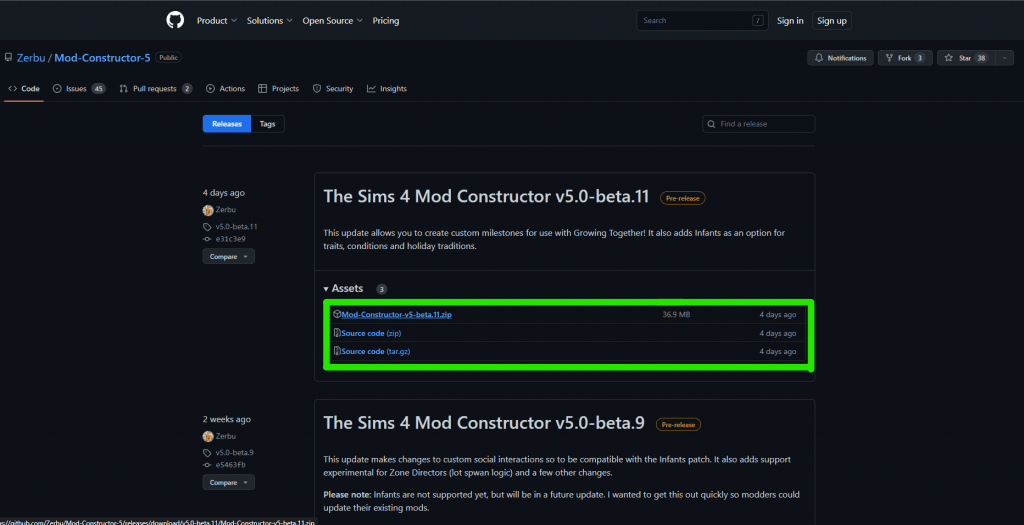
To start using Mod Constructor, you’ll need to download it from Zerbu’s page. Currently, the latest available version is V5.0-beta.11. To get this version, you can go here, where you’ll find the.zip folder needed for installation in the Assets section. The latest update adds mod options for infants and includes custom milestones that came with Growing Together. Once you’ve downloaded the latest version, extract files to a folder of your choice, and go to the location where you’ve extracted them. To check if there are any Mod Constructor updates at the time you are reading this, go here.
Find Constructor5 and click on it to launch Mod Constructor. It’s as simple as that! The program may ask you to install a relevant version of Phyton to access all options if you don’t have it already. This will take only a couple of minutes, and once it’s all set, you can start using the program.
How to start using Mod Constructor?
Using the Mod Constructor is fairly simple. When you launch it, the program will ask you to credit your mods, so you can choose your mod creator name and choose a name for the mod you are planning to make.
After confirming that you are happy with the mod name via the ‘’Create Mod’’ button, the program will open a window where the magic happens. You will see four main options on the bottom left of your screen: Advanced Filter, Report Bug, Add Element, and Export Package. The first two allow you to make advanced changes and report bugs you encounter, while the last two are for designing mods and exporting them, so that they can be used in the game.
As you keep creating new mods, every time you launch the Mod Constructor, you will see them listed, so that you can access and rework them anytime.
how to start creating mod elements?
Once it’s successfully launched, to start creating, you’ll want to go to the ‘’Add Element’’ option. Select the element from the list, confirm with ”Create Element”, and it will appear in the upper left corner, which means it is activated and a part of the mod you are making. Some elements you can play with are hidden, so make sure you tick the ”Show all” box to see them all.
One mod made in Mod Constructor can have a few of these. For instance, if you make a mod called Social Anxiety Mod, it can include Buffs, Wants and Fears, Personality Traits, and Social Interactions that match the theme – all in one mod.
how to edit mod elements?
Every element comes with additional options that allow you to tweak and customize it. To access all modding options available for that element, just click on it, and the options will show in the workspace. This includes a ton of in-game interactions, aspirations, skills and skill rewards, aspirations rewards, actions, and moods that you can re-purpose and adapt in your mod.
Mod Constructor allows you to name the interaction or category you are modding (the name will be visible in the UI), choose the icon from the icon menu, and add a description. For icons, you can either use icons that already exist in the game or use custom-made ones.
For many, you’ll be able to pick when and under which conditions you want your Sim to react to the mod triggers. You can even choose which Sims will be impacted by the mod based on their personality traits, age, or other criteria. Every element is different, some have more options than others, so take your time to experiment and try out different features.
How to add mods from mod constructor to sims 4?
All mod elements you make will be listed on the left side of the screen, above the main Mod Constructor options. Once you have all the elements you planned for the mod, you can proceed with Export Package. You can export it directly to your Sims 4 mods folder (Documents>Electronic Arts>The Sims 4>Mods). This will add your mod to the list of mods and CC you have in the game.
Now that everything is set, it’s testing time! Launch your game and test if your mod features show in the game. For instance, if you’ve created a new lot trait, go to lot traits on a random lot to see if it works. If the option is there, congratulations! You just made a cool new mod.
What are the key features of the Mod constructor?
The great thing about Mod Constructor is that it allows you to run wild and combine the uncombinable if you want. You can get really creative, as options are limitless! There are dozens of options and possibilities that come with it. Mod elements let you customize the tiniest details, from pie menu icons and names to features, and actions. You can choose which age groups are impacted by the feature, set different values and thresholds for options, and more.
We will walk you through a few key features, to help you get a general idea about what you can do with the program. Let’s dive into it!
Aspiration Track
Aspiration Track allows you to set new fun, fully customized aspirations for your Sims. The aspiration is built from a list of categories found in settings. You can make aspirations for Sims of all ages, name, and tweak aspiration objectives, and set reward traits. You can even go a step further and associate wants and fears with the aspiration.
To illustrate, you can have a ‘Living in the Dirt’ aspiration with the objective to knock on a few trash cans, invite guests over to a dirty house, shower in a dirty tub, and max out fun motives in dirty surroundings. Or, you can make a ‘Crazy Cat Lady’ aspiration, with the reward trait ‘Needs No One’. Cool, isn’t it?
career
Ever wanted to make a career for children adn teens? Well, Mod Constructor lets you do that! Come up with an interesting company name and start building a never-seen-before Sims 4 career! Besides letting you include Sims of all ages into your corporate system, the program allows you to enable or disable paid time off. Sims can be on a paid vacation for as many or as few days, and can spend their whole lives getting simoleons without moving a finger! You can make them work from home and set work-from-home assignments or create custom branches and career levels.
Mod Constructor lets you add not only career interactions but also specific conditions for future applicants so that not everyone can apply for the job. Just as an example, you can set the Level 5 Handiness and Confident mood to be the only terms under which a Sim can successfully apply.
preferences
If you love setting likes and dislikes for your Sims, you can now make your own. Mod Constructor lets you name and customize personal preferences for all Sims, from children to elders. Their preferences impact how they feel, gain skills or build relationships. With this program, you can select random autonomous behaviors triggered by likes and dislikes, set how these impact others, relationships, and so much more.
Sims can like feeling lazy, but this can make them get into a sad mood faster than usual because deep down, they know they are wasting time! Because they dislike snobby behavior, this may ironically motivate them to learn painting and play violin 3x faster. When feeling lazy, they can autonomously start napping or playing video games. And this is just the tip of the berg!
Holiday Tradition
Now you can make your very own weird Holiday traditions! Mod Constructor allows you to create a tradition, set an interaction associated with it, and set a condition that needs to be fulfilled for it to count. This can be anything, from having a specific emotion or wearing a career outfit. Every action can have a number of repetitions that need to be completed. The mod constructor supports up to 100 iterations, but it’s advisable to stick to 6, which is the in-game limit.
You can make a Holiday tradition as ‘’normal’’ or as ‘’crazy’’ as you like. For example, you can make a tradition where Sim needs to Make an Espresso to start the work day, but the Sim needs to do it for 5 days before work. You can add only one, or add a list of conditions if you like challenging yourself and your Sims.
From there, in Preferences, you can set who the tradition applies to based on age groups or personality traits. The tradition can even be location-specific if you like, and Sims can also have special holiday buffs during or after the holiday, so you can play with those, too!
milestones
Life milestones are here, thanks to the Growing Together pack! Now, thanks to Mod Constructor, you can tweak milestones as you, please. The feature lets you make goals and set iterations for each, chose objects that are required for goal completion, and add conditions that need to pass for the milestone goal to count.
Mod makers can create repeatable or one-time milestones, and select age groups for them, from infants to elders. They can also choose what actions will take place after the milestone is unlocked.
Lot Trait
The lot trait option allows you to customize how Sims will feel while on a specific lot. You can create your very own lot trait, and make it as crazy as you want it to be. For every lot trait you make, you can set a buff Sim will get when they are on the lot. By default, when you create a new trait add emotion category is disabled by default and the timeout is hidden and 2147483647 will be the maximum value for the duration of the buff.
Mod creator lets you pick actions that will take place when Sim enters and leaves the lot with your custom trait. For instance, Sim can have a Vampire appear before them or you can have a blizzard start as soon as they step onto the lot. Then, once they leave or in the open area around the lot, they can gain celebrity rank – anything can happen!
odd job
If you love odd jobs, you will love this feature. You can make a brand new odd job and have full control over how it’s done. The program allows you to set duration hours, and make Sims work anywhere from an hour to hundreds of hours. Odd jobs are rabbit-hole jobs by default. However, you can now turn a typical odd job into an assignment job and select a clear objective for Sims to complete during work hours. The objective can be anything, from mopping the floor to marrying their BFF!
Mod Constructor lets you pick a custom payment amount, and you get to control skill requirements, and star ratings, and make it a low or high-bucket job. Once the odd job is completed you can choose which action will take place. Feel free when you want that action to be performed: for high success, normal success, normal failure, or critical failure.
situation/social event
Events are a great way to spice up your gameplay. Thanks to Mod Constructor, now you get to choose how many participants you want, how long the event last, and set a cost for it.
The program will let you create goal-oriented and activity events, tailored to your needs and game objectives. You can pick goals and activities separately, but also go a step further and chose optional and required activities, as well as main goals and goal sets.
With this program you even can give Sims rewards for every completed event, but only if you want it to. You can set gold, silver, and bronze reward, and this can be anything, from getting a calming aura to becoming a green thumb. Some events are private events only, so go ahead and customize what type of lot would be perfect for your custom event. Include or exclude residential lots, or make a lot exclusive to any specific lot type you want.
social interaction
Social interactions are building blocks to relationships that tailor our gameplay, so why not make them even more interesting? Thanks to Mod Constructor, you can make unique interactions for your Sims and make them as weird or as powerful as your soul desires. You can make Sims do them autonomously or at your command only – or both. Hide it, or use a cheat to unlock it. Mod makers can choose a default pie menu icon, and most importantly, select under which conditions will the interaction be unlocked.
For instance, only Sims with a happy buff perform can it but you can also choose a blacklist condition under which it can never be unlocked, like angry or sad. The program lets you choose to whom the interaction applies, as well. The interaction can be unlocked for all Sims, but you can also limit it to certain groups, such as active households, social groups, or lot owners. Plus, you can also choose what actions will happen before, during, and after the intervention. So many options!
Trait
This Mod Constructor element is all about creating custom traits for Sims of all age groups, from babies to elders. The traits we chose for our Sims impact many areas of their lives, and this element lets you pick how exactly you want the trait to manifest in their reality.
This Mod Constructor element can impact skills, relationships, emotions, and buffs, to name a few. Let’s say you want to make a Sim with Type A personality trait. You can tweak the trait so that it makes them more likely to feel confident, but more irritable and prone to anger, which can negatively impact their close relationships. You can even create pie-menu interactions just for Sims with this trait, or assign actions that Sims with this trait will perform autonomously, which is a nice detail.
Watch this helpful guide to learn how to create traits using the mod constructor!
buff
With Mod Constructor, you to make custom buffs! Sims can have an emotion tied to the buff and you can set how intensely they feel it. For instance, if you make a Confused buff, you can set the Sims to feel Uncomfortable and Dazed. You can choose when and if you want the buff effect to expire, which gives you control over how long the Sim will feel its effects.
The buff you make can impact skills and learning, too. For instance, if the buff makes them Dazed, you can make them gain some skills 5x slower – because who can learn when they are confused about what they are learning, right? Besides skills, the buff can impact their relationships and social life, general needs, and even reputation. The buff can inspire Sims to take any action you want them to. So, if the buff makes them happy, you can make the Sim giggle. Options are limitless.
Want/Fear
The want/Fear system allows you to play with psychology and make sets of interesting wants and fears for your Sims. Fears and wants in Mod Constructor can be generalized, or reserved for Sims with specific personality traits only, or triggered only on specific occasions. For instance, you can create a ”Fear of Being Judged”, but reserve it only for those with the Perfectionist trait. Or, you can make a ”Give a Nitpicky Comment” want, but have this triggered only when Sim is a guest somewhere.
You can set cooldown periods and interactions for both wants and fears or how many times you want a goal to be completed to have your Sim’s wish/fear fulfilled.
other elements
Mod Constructor possibilities don’t end with odd jobs, traits, or social interactions mentioned above. This complex program includes a bunch of other features that help you tweak the game and make your mods. These are:
Action Triggers – Make your Sim complete an objective, and this will trigger an action you choose. Mod makers will choose which Sims applies to. Your Sim just kissed their SO? Romantic buff is triggered! They just exercised? Someone is pumped and confident!
Aspiration Category – Create your aspiration category and chose an icon for it!
Balloon Set – Use this Mod Constructor feature to make balloon sets, with positive or negative overlay and custom weight value
Broadcasters – Wanna add broadcasters? Start here.
Commodities – Choose how fast or slow a commodity will decay, and whether or not it will decay off the lot, or will persist after loading, traveling, or saving. A commodity can also be removed once it drops to your lowest chosen value. Mod makers can also choose buffs for each commodity, and tweak how impactful they are and how long buff impact lasts.
Complex Want and Fears Set – Gain more control of how fears and wants manifest in your game by playing with presets, cooldown timers, and decay rates. Mod Constructor lets you add activation objectives and play with activated and chain priority values to make the best of custom fears and wants.
Compound Condition Element – Use it to group a few conditions.
Custom Tuning Element – This Mod Constructor feature lets you fully customize elements, from scratch.
Enum Extension – If you want to make custom tags, start here. You can use them with objectives adn goals, and can then add them to EA extensions if you desire.
Loot Action Set – Create your action sets.
Mixer Interaction – This element lets you create interactions with specific features and take them. Here you can Choose an action that will take place before, during, and after the interaction adn chose how frequently the interaction shows up after loading and after performing. You can also make ”idle” interactions, which are usually connected to buffs and traits.
Objectives – Create your call new objectives, select satisfaction points for them, and chose under which conditions the objective can pass.
Objective Set– Make simple objective sets and add unique rewards for each.
Pie Menu Category – Make collapsable categories choose priority and an icon for them.
Preference Category – Create a special preference category. Make a name in plural, and CAS name in singular.
RelBit (Relationship Bits) – this element helps you create new types of relationships. After you give them names and descriptions, you can choose the duration and whether or not you want the relationship to fizzle out after some time. Or, you can even make it one-sided. A great way to make onesided crushes or enemies, right?
Reward Set – Use Mod Constructor to make a set of rewards for individual Sims or whole households.
Sim Filter – Gives you a chance to ban certain Sims, such as Reaper, am=nimals, or Temperance, and filter out Sims based on career, age, traits, skills, and more.
Situation Activity – Set interactions, cooldown, and iterations, and add role tags and conditions that need to be met for situation goals to count.
Situation Goal – This Mod Constructor feature lets you set specific goals for random situations, enable or disable expiration, chose when the situation goal expires, what conditions need to be fulfilled for the goal to count, and more.
Situation Job – Control auto invite and player invite upper and lower thresholds, manage Sims their job outfits, and choose actions that will run when the goaled event ends.
Statistics – Set up initial, minimum, and maximum values.
Super Interaction (Experimental) – Want to make immediate or phone interactions? Start here! Here you can choose autonomous or player-controlled interactions, add interactions to objects or phones, set conditions that trigger the interaction, and tweak interaction features.
Want Set Extension – Use this Mod Constructor element to add new wants to already existing sets that are not part of the mod. This goes for EA sets, too.
Zone Director / Lot Spawn Logic – Make no zone detector type or shift-based zone detectors, or blend your zone director with already existing ones.
conclusion
This was your basic introduction to Mod Constructor and its incredible features. Being simple to use, this is a nice starting point for every mod maker and Sims 4 lover. It’s versatile, easy to install, and easy to use. Try it out yourself, and have fun!