

Are you interested in finding new, better ways to do business in Sims 4? If that is so, then business mods are the way to go! Welcome aboard and read on to discover the best mods for entrepreneurial, business-minded souls!
350 CC Items! Time to celebrate! 🎉
Before we begin: Thank you! We’re celebrating 3 years and 350+ CC items. As a gift, supporters can get all our free CC at once here: ALL IN ONE DOWNLOAD

doing business in sims 4
Thanks to the Sims 4: Get to Work expansion packs, our Sims can own stores and start their own business. They can sell merchandise, and earn a living by doing so. Although there are a few available venues in-game, and plenty of options to try out, business mods can be real game-changers. This can be in terms of available venue types, how items are sold, or how a store is managed.
They are meant to give you more options and more freedom to manage your business the way you want to, and ultimately improve how business is done.
So, to help you out, we will walk you through the top business mods that will add more options for running a business and making money. Enjoy the ride!
1. Live in Business by LittleMsSam

If you ever wanted to run a business from your active lot, this business mod is the opportunity you were looking for. Live in Business is a mod from LittleMsSam that adds custom lot traits to your gameplay that you can choose and activate if you want to start a business. This mod makes your Sim live and work on the same active lot (a lot of your playable household). You have the option to choose a few businesses, set entrance fees, or charge your services, as you would with any other commercial lot.
- Live in Cafe – Requires Sims 4: Get Together
- Live in Bar
- Live in Club
- Live in Daycare
- Live in Gym
- Live in Pet Daycare
- Live in Vet Clinic
- Live in Store
The Live in Business consists of a few files: the main mod file which needs to be installed, and the additional files, one for every lot trait available, which are optional. You can install all or only choose those you are drawn to the most. Now, let’s get into each of the business types! Get the Live in Business mod here!
How the mod works?
The first thing you’ll want to do when playing with this business mod is to choose one of the eight types of business you want to start. You can have more than one business on your lot, but be mindful when you do so, as activating more can create lags and issues, which is something everyone wants to avoid when playing.
To activate and deactivate mod features, click on any entrance (doors, gates, or arches). You will have guests spawning to your place and customers will start roaming around your active lot just like they would on any commercial lot.
It is up to you how you’ll organize space and separate your private life from your business area once you activate any feature from the Live in Buissines mod. Ideally, you’ll want to lock all entrances to your private areas to restrict access from nosy Sims.
live in cafe or Live in Bar
Live in a Cafe is a business mod feature that turns your home into a cafe where you can sell drinks and food. You will be collecting income from a home PC or Tablet. This is a great way to not only bring work to your active lot, but also to earn a solid $1.500 to $1,750 by serving customers. If you like, you can keep the cafe open 24/7. Similarly, you can also live in a bar, sell drinks and collect daily income from 1.000 to 1.250.
Live in a club, daycare, Gym, or Pet Daycare
The income for these 4 ”Live in…” business mod options is mostly based on entrance fees. Your Sim will be handling daily tasks and charging fees from 1$ to $999 per Sim spawning on a lot, be it a child, an adult, or a pet. Entrance fees are collected once the work day ends, via a tablet or a computer. You chose when to open or close any of these businesses, so if you want to be open 24/7, feel free to do so, and Sims will spawn to your lot as long as you are open!
- Live in a Club – Open a club and earn a living by giving townies space to party! You can set the entrance fee to be as small as $ 1 or as big as $999.
- Live in Daycare – Your task will be to care for 5-8 toddlers for 12h or so (depending on when you decide to close daycare). The fee per toddler goes from $1 to $999.
- Live in Gym – Besides setting the entrance fee ($1-$999), another way to earn simoleons with this business mod option is to become a yoga instructor and give Yoga Classes. This is an optional feature and is available in the More Buyable Venues mod (check it out in the sections below). For this, you will need a yoga mat you can buy from the Buy menu>Activities. You can either hire an instructor by clicking on the mat (one will spawn to your lot) or become one yourself. If you chose to hire an instructor, just click on the mat once they spawn and select one of the three yoga classes available! If you are contemplating becoming a yoga instructor yourself, you’ll still get to choose from one of the three classes, but make sure you reach level 8 in wellness skills, as this is mandatory.
- Live in Pet Daycare – If you have Sims 4: Cats & Dogs installed, you are in luck, as this means that you can use this business mod to open a pet daycare on your active lot. This is a perfect business for animal lovers and will allow you to train and even do crazy parkour with them while they are on your lot! You will be taking care of up to 7 cats and dogs from your town and set the fee for pets from $1-$999.
live in vet clinic
A Vet clinic venue is already available in the game, but this one is a little tweaked. Similarly to the Live in Pet Daycare, this business mod feature also requires Sims 4: Cats & Dogs. Just like in a regular vet clinic in Sims 4, you will be helping cats and dogs to get better. You will be notified when a new pet patient spawns so that you can begin the exam on them using the exam table. You will need a special Vet Exam Table and a Surgery Station Medicine. You can get them online via the computer and they will be shipped to you in your mailbox.
Besides treating patients, with this business mod option you’ll also need to do side tasks, such as filling the bowls or cleaning the clinic. If you find that there are too many cats and dogs that require treatment and you can’t handle all the work yourself, you have the option to hire a helping hand or a few (use entrances on your lot to hire or fire them).
Be mindful that they can’t treat patients, and cannot be hired to help around. Hiring an employee costs $250, so calculate your expenses before hiring more than one. And salary? Well, it varies from $500 to $1000 per patient treated! Install a special Vet Clinic addon if you want to get uniforms for employees and have more cats and dogs spawn per day.
Live in Store
Live in Store feature allows you to open a store on your lot and sell a huge variety of items to customers spawning on your lot. There are a few types of objects that this business mod option allows your Sim to sell: craftables and artwork, collectibles, food, fish, and harvestables.
This can be anything, from books your Sim has written to woodcrafts, knitted stuff, pumpkins, paintings, potions, serums, and flower arrangements, to treasures, crystals, metals, and seashells Your Sim can also sell cooked and baked goods if they are not spoiled. The higher the quality of a meal, the higher the chance someone will purchase it!
To start selling stuff with the business mod, you will need to set things for sale. You can do so by clicking on an item you want to sell, on the plant if you are selling harvestables, or on the retail display if you are selling fish and food. To sell fish, make sure you get an aquarium or a retail display and click on it to set fish for sale. To increase your chance of selling food make sure you display freshly made food and display it in a retail display. To sell harvestable, set them for sale directly by clicking on the plant that’s ready to be harvested.
No matter what the initial price you’ve set was, you can always use the live in business mod to dial it down or raise it, by choosing one of the four markups (0, 25, 50 and 100).
2. More Buyable Venues by LittleMsSam

Ever felt like venues available in the game are just not enough? Well, if you need more versatility, More Buyable Venues business mod is the one for you. This is another mod by LittleMsSam that lets you expand business and adds more options to make money through entrepreneurship.
Besides stores, clubs, libraries, gyms, museums, or pools, you can now own new custom venues such as a holiday home, a gaming center, daycare, playground, cinema or a customizable venue of your choice! You can use this business mod to open and close business like you would in real life, and you can have rentable venues with unique lot traits and turn it into a hotel, an apartment, or even a prison. If things become to much to handle, the mod allows you to hire a maid, a handyman or a gardener to help you out, and besides having a relatively steady income from your business, you can earn extra cash by setting entrance fees.
To download the More Buyable Venues Mod, go here. To learn more about this incredible business mod, go here!
3. Attend a Business Trip Interraction
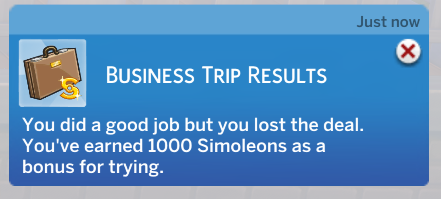
Here comes a small but mighty mod for all your employed Sims! This business mod adds an option for going on a proper business trip to seal the deal. Your Sim can make or break a deal, and based on how successful they are, they will earn either a confident, or a tense buff that will last for a couple of hours. This is a great addition for those who’d like to earn more simoleons but still avoid using cheats, as if the deal is sealed, your Sim will gain a handful of extra cash as a reward.
The mod applies to all Sims careers, so any employee character can go on a business strip. To send them, just click on the phone, and chose ‘’Attend a Business Trip’’ and off they go! To download and try it out, go here!
4. Seleabration Retail System

Seleabration Retail system is a business mod that allows you to set anything you want for sale, even food. If you chose you don’t want to sell something after all and have decided to keep an object in your private possession, you can always do that.
You can always Enable Marked Items for sale, or disable them in case you don’t want to sell them anymore. All items put on sale will have the same price as they would if they were sold directly from the inventory. However, you have some control over prices, though. You still have the power to play with prices a bit, play with markup percentages or put an object for sale. If you don’t own a store, you can still tweak prices, by clicking on an object and selecting ‘’Enable Retail Interactions’’.
Saelebration business mod lets you set items for sale on any lot, whether you own it or not, whether you live on it, or not. In other words, any lot, be it a community lot, a residential, or a retail lot can be turned into a store, and you don’t even have to own it if you don’t want to. On top of that, you can even add stuff for sale to any pre-existing venue that comes with any Sims 4 expansion pack.
how to sell objects with saleabration mod?
To start selling merch with Saelebration business mod, you’ll need to open a business on your lot of choice, first. To do that, you will need a controller sign that lets every townie know that your business is open, so go to Buy>Activities and Skills, purchase, and place Open for Business Controller, give your Sim the business owner trait, and you are ready to start making money from your merch! You will be using this sign for starting a business, giving your business a name, and managing all your business, from setting stuff for sale, to opening and closing the store.
Click on the individual object you want to sell, and select the set for sale option – it’s as simple as that! You can quickly purchase new stuff for your store by using a special Llamazon Marketplace card by Ravasheen, which is compatible with Sealabration business mod. To check it out, go here.
The best part is, you won’t have to restock, as exhibited items will remain where they are, and will just be copied to Sims’ inventories. If your Sim feels tired, you can close the shop any time! You will be receiving daily payments after you close the shop.
You can download and learn more about the Saelebration Retail System mod here!
conclusion
This was our list of the best mods that can help you run a business in Sims 4. Business mods not only bring more business opportunities and improve how business is done, but they are also great for making a steady and solid daily income. If the list has sparked your interest, try one or all of them, and have fun experimenting with the features available!