
SnootySims

11 Build Cheats That Will Completely Change The Sims 4!

Photo of author
Author: Nicole
No Comments

The Sims 4 really knocked it out of the park when it comes to ease of building compared to older games, but did you know there’s even more building power hidden behind cheats & other secrets? We’ve got your guide to even better builds with 11 cheats and other tips!
sims 4 build cheats
11 Sims 4 Building Cheats That Will Completely Change Your Game!

350 CC Items! Time to celebrate! 🎉

Before we begin: Thank you! We’re celebrating 3 years and 350+ CC items. As a gift, supporters can get all our free CC at once here: ALL IN ONE DOWNLOAD

If you ever peruse the Gallery you’ll find a huge variety of lot builds, from basic starter homes to amazing estates full of details you never imagined could be accomplished in the game without mods. Extra clutter, decorations that you normally have to unlock, items in the game you didn’t know you can even access…how do they do it?! Well, they did it with talent, but also with build cheats. Today I’ve got 11 essential build cheats and tricks to make creating the lot of your dreams even easier, and maybe even open up some new possibilities you never considered before!

Build Cheats & Other Tricks

After you’ve enabled them there are a number of build cheats you can use to make building easier in the Sims 4, no mods or CC needed!

Note: Due to the formatting of this article, several cheats beginning with “bb” have been capitalized. If you copy + paste from here they should work without issue, but if for some reason you run into issues try changing the capitalization.

1. bb.moveobjects

The Move Objects cheat is one of the most popular build cheats for Sims 4. This cheat allows you to place any item in the game pretty much anywhere you want. For example, you can take a plant decor object and place it on your kitchen counter in the exact slot you want. You can also use it to move two or more objects together, combine them, and create unique shapes. It’s the first cheat most players learn because of how useful it is.

Watch the following tutorial for more info!

Sims 4 Build Cheats: Moveobjects!

2. F5 Key

Hitting the F5 key on your keyboard will enable quarter tile placement, which means that you can move objects along the grid in even smaller increments. It’s great for cluttering things up and giving more realistic placement, such as moving a night stand closer to the side of a sim’s bed. Combining it with the MoveObjects cheat will give you even more options.

3. ALT Key

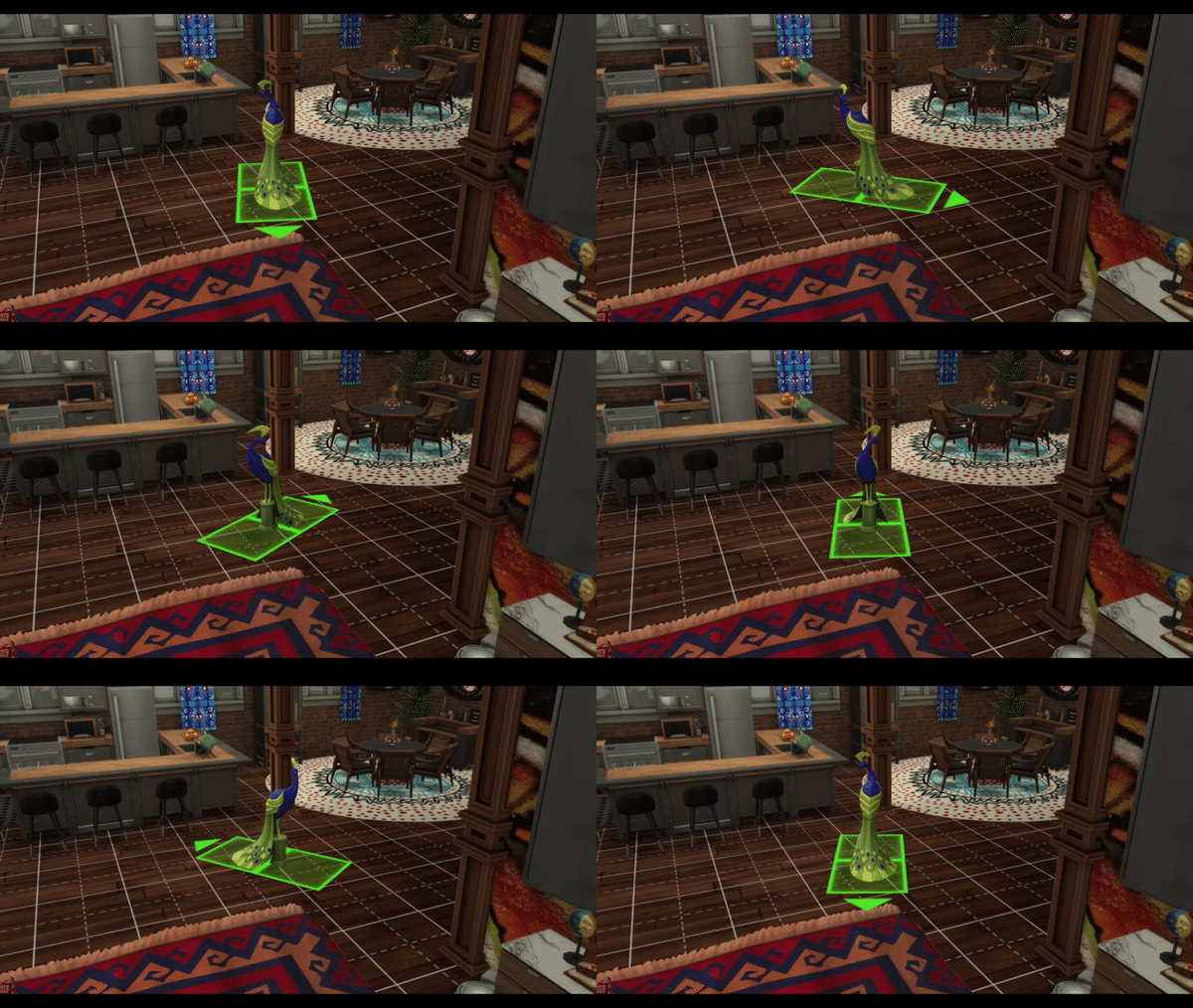
If you find that F5 isn’t giving you quite enough freedom and/or you want to change the direction of an object’s placement outside of the default 8 directions, the ALT key is your new friend. Holding it down while moving an object will free you from the grid, allowing totally free placement anywhere on the lot. Holding down this key when placing an item and not releasing your mouse button will allow you to drag and rotate the object in place to any direction you desire! Combining this tip with the previous 2 will give you a whole range of new ways to place items in the game!
sims 4 build cheats
Round and round it goes, where it stops is exactly where you want it to!

Additionally, when placing wallpaper if you hold the ALT key, it will apply wallpaper to the entirety of a single wall as opposed to a single tile or a whole room (which is what happens when you hold Shift). It depends on how the game recognizes each room so it might not be perfect every time, but it’s still nifty.

4. [ and ] Keys

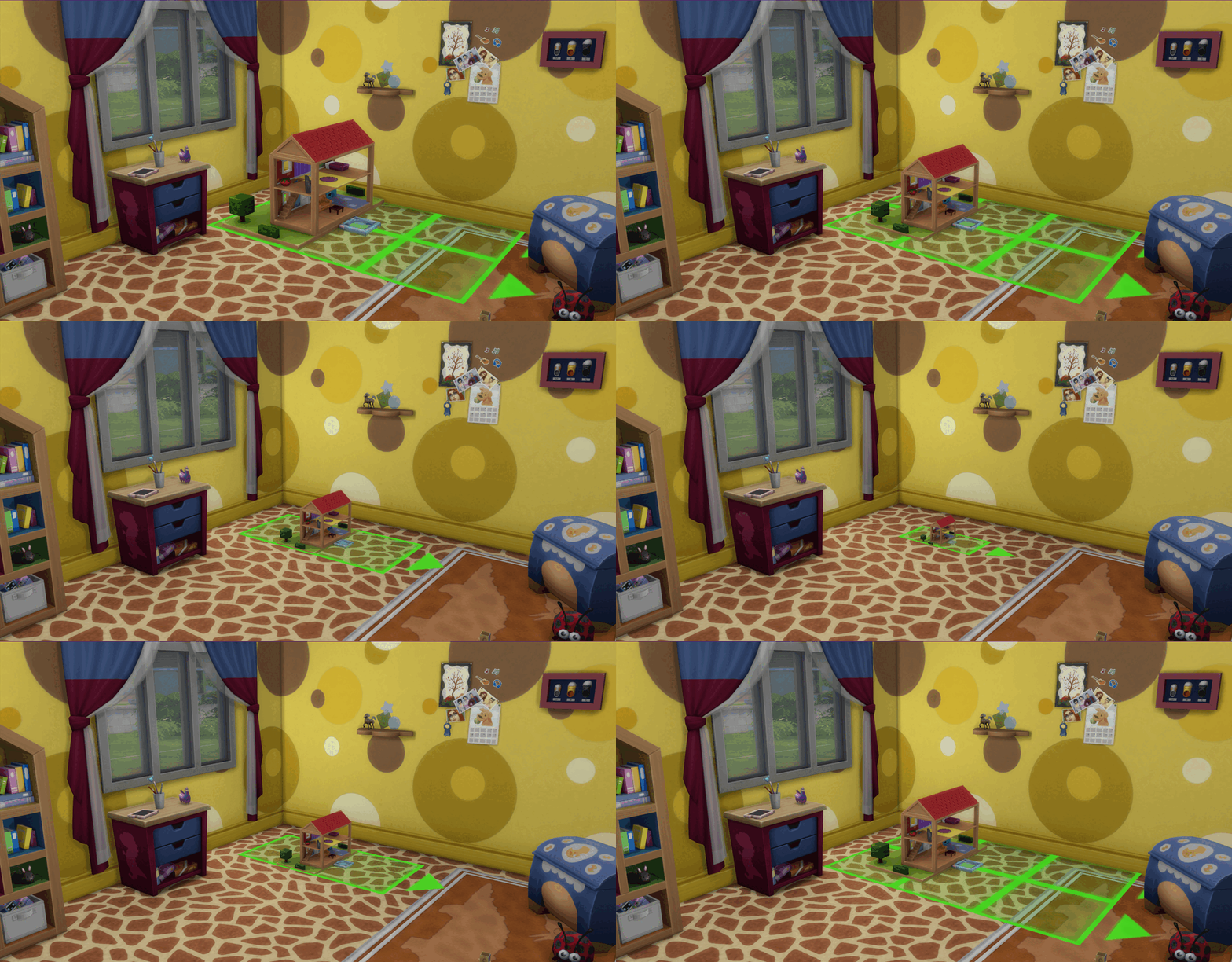
When you’re holding an object you can use the [ and ] keys to shrink or enlarge items, respectively. You can use both of these commands to enlarge or minify any item in the game, including plants, furniture, and anything else you want. By doing this, you make every object in the game fit in a unique way. With how out-of-proportion some items in the Sims 4 can be, this little trick is extremely useful; a perfect example is using it to size-down those massive dollhouses.
sims 4 build cheats
Objects like this should still function when sized down, so long as sims are given room to access them!

5. 9 and 0 Keys

When holding most objects, hitting the 9 or 0 keys will raise or lower the item. It’s handy for placing wall art at just the height you want it to be, raising ceiling lamps to hang from angled roofs, adding more clutter to wall shelves, or my personal favorite: using it to raise cabinets over fridges & counters to make everything look nicer & more accessible.

Tip: because camera angles can be bound to the different number keys, sometimes hitting 9 will send you flying off somewhere else on the lot. Holding CTRL before hitting the 9 key will prevent this from occurring.

6. Bb.ignoregameplayunlocksentitlement

Nothing stinks like finding the perfect item in the catalog for your build only to learn that it’s locked behind a career your sim isn’t even part of. This cheat unlocks all of the career rewards in the game, including all the styled rooms. No more sad grayed-out catalog icons here!

7. Bb.showhiddenobjects

This cheat unlocks all the hidden objects in the game, giving you a great variety of items when you build. These include collectibles, completed knitting projects, fruits & veggies, pet treats, and some of the odds & ends that will generate during animations such as the hand tools used when crafting or repairing objects.

8. Bb.showliveeditobjects

Similar to the previous cheat, the bb.showliveeditobjects unlocks more items for you to use. This one, in particular, unlocks over 1000 world and environment items that you normally don’t have access to including §0 outdoor plants and fences that make building pretty starter homes much easier.

Tip: Due to the randomness of how the Hidden Object and Live Edit Object build cheats work, it’s wise to use both at once in order to get the full scope of unlockables at your fingertips!

9. Bb.enablefreebuild

The bb.enablefreebuild cheat is perhaps one of the most convenient build cheats for Sims 4. This little cheat will let you go into Buy/Build mode on any locked lot, such as career lots, special venues, and community lots your sim is currently visiting. Perfect if you need to quickly fix something or add a new object to the build without having to go through the rigamarole of exiting and going back into the lot in Build mode, or for replacing special venues like those from Get To Work.

10. Shift (when Placing Trim and Friezes)

If you’re trying to place trim or friezes you might notice that the game likes to automatically decide where on the room it’s meant to go, which occasionally can really affect the way your build behaves. If you want to place this kind of accent on only a single wall, hold Shift. Unlike how it will fill a room with wallpaper or flooring, the Shift key in this case tells the game you want more precision and will relinquish control to you one wall at a time.

11. Shift + C

This last tip is incredibly simple but it can make a massive difference in your builds! If you press Shift + C while in Build mode, you’ll be given multiple ways to manipulate the roofing. It will soften the curves of the roof shape and give you access to additional drag points so you can make all sorts of neat shapes with it. Fairy mushroom tops and stately pagoda roofs are a mere click and drag away!

ezgif.com gif maker 1 1
Notice how the roof texture is no longer distorted, and there are extra drag points for more precise adjustments.

Troubleshooting and FAQ

Mastering these build cheats and tricks will take practice, and it’s possible to run into some hiccups along the way. Here are fixes for some of the most common issues.

Why can’t my Sims access (items/object/etc)?

Part of the reason the game has default restrictions on where things can be placed is because sims need to be able to access everything. If you put too many objects close together or block access to an object, your sim won’t be able to use it. The easiest way to prevent and/or fix this is to place necessary objects before activating MoveObjects. You can still use the F5 and ALT Key tricks without activating the MoveObjects build cheat so you can still get some of the freedom while allowing the game to limit where things can be placed so it can be accessed.

Why can’t my sim use the computer?

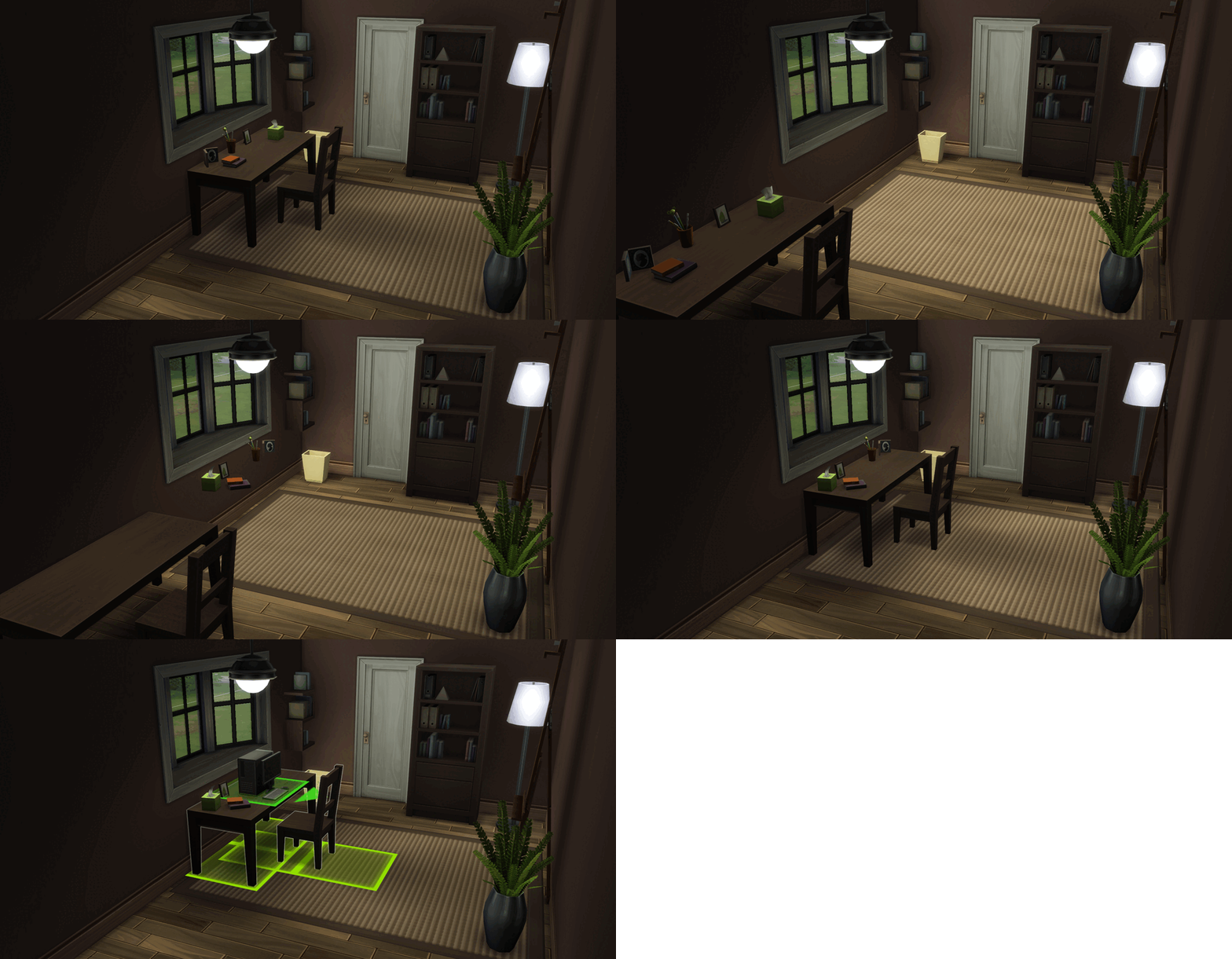
If you’ve used MoveObjects to place clutter on a desk or table where a computer is, some of the slots will conflict and render the computer inaccessible. There are 2 ways to fix this while maintaining the look you’ve created. The first way is to just direct your sim to sit in the chair at the desk and once they’re seated have them use the computer; for some reason this works but you will need to watch your sim and make sure to add the computer action to their queue before they decide to get up out of the chair.

The second way is a bit trickier, but works much better:

  1. With MoveObjects active, place whatever deco items you want on the desk.
  2. Move the desk away from the spot you’ve placed it.
  3. While holding the ALT key, grab one of the items from atop the desk. Since MoveObjects is active, the item will stay floating at the height it was at on the desk instead of dropping to the floor.
  4. Now you can bring the object back over to where you originally had your desk, and place it somewhere in the area. Do this for all the deco objects you want, though it’ll probably take a little practice to get everything just-so.
  5. When you’ve got everything where you want it, put the desk back. What you’re essentially doing is having the items “floating” above the floor, but they just so happen to be floating at the level of a desktop so it looks like they’re sitting on the desk when they’re really not.
sims 4 build cheats
With items “floating” above the desk, the computer can be placed without issue!

I changed my wallpaper and all my items disappeared!

If you place items with MoveObjects on and later shut the cheat off (or the cheat deactivates due to reloading the lot or other reasons), placing wallpaper will sometimes remove decor objects that were placed with the cheat activated. While I’m not sure why this is, it’s easy to fix by having MoveObjects active before you start building. Alternatively, hit the “undo” button so all your decor goes back to where it was, then activate the MoveObjects cheat, and then place the wallpaper. As long as MoveObjects is active, nothing should disappear.

Closing Thoughts

Building in the Sims is easier than ever before and players are free to build all sorts of cool creations with the tools provided. If you’re savvy to build cheats and tricks though, you’ve got even more build power over previous titles. With this list we hope you’ve learned a thing or two, and that your next lot build is your best yet! Enjoy, and happy simming!

Related Content


Follow SnootySims on Social Media:

Join us on our journey to discover the latest and finest Sims 4 custom content, as well as stay updated on news and rumors surrounding the highly anticipated Sims 5! 🌟

Our Latest Custom Content @ Patreon


Latest CC Finds @ SnootySims


FOR SIMS FANS, WITH LOVE ♥

We're on Patreon, too!

We've now shared 350+ CC packs on our Patreon. Find your next favorites — made with love for your Sims. ♥

Supporters also get a handy one-click download.

Discover our Patreon
FEATURED SIMS 4 CC · AMARA

A little Nordic warmth. 💚

Meet the NORDLYS Set: cozy furniture, soft textures and warm neutrals for your Sims’ homes.

Explore on Patreon Availability and download details on the creator’s Patreon.
SNOOTYSIMS

Privacy Policy

SNOOTYSIMS

Privacy Policy

Effective Date: October 2, 2026
Last Updated: October 14, 2026

1. Introduction

This Privacy Policy explains how SnootySims (SnootySims.com, the “Site,” “we,” “us,” or “our”) collects, uses and discloses personal information when you visit the Site, create an account, subscribe to emails or contact us. It also explains your privacy choices.

2. Information We Collect

We collect information you provide through account features, subscriptions and support requests. This may include your email address, display name, profile photo, preferences and the contents of your messages. Please do not send information that is not needed for your request.

Our Site and service providers may automatically receive your IP address, browser and device information, operating system, referring page, access times, pages viewed, searches, link or ad interactions, and cookie or device identifiers. An IP address may be used to infer approximate location. Advertising partners may derive interests or audience segments from browsing activity.

3. Account Information

We use Clerk for account creation, email/password authentication, sessions, account recovery and security. Account data may include your email address, internal account ID, display name, profile photo, account settings, authentication and password-reset information. If you choose Google sign-in, we receive the information you authorize Google to share.

We use this information to provide account features, recover access, respond to support requests and prevent fraud or abuse. If you use My collection, we store the CC items you save and your 20 most recent distinct searches with your account. You can remove favorites and clear your search history in My collection. These lists are private and are not published to other users. You can contact us to request deletion of all associated records. Account registration does not automatically enroll you in marketing emails.

4. Newsletter and EmailOctopus

If you separately subscribe, we may send newsletters, new Sims content, site updates and occasional promotional emails. Subscription is optional and is not required to create an account. Essential account, security and service emails are separate from marketing.

We use EmailOctopus to manage newsletters, with Amazon SES for delivery through EmailOctopus Connect. Subscriber information may include your email address, optional name, consent and subscription status, signup source and time, confirmation records, unsubscribe status, delivery information and technical information needed to send emails.

Where campaign tracking is enabled with any required consent, EmailOctopus may record email opens through tracking pixels and link clicks to help measure campaign performance. See the EmailOctopus Privacy Policy.

You can unsubscribe using the link in any marketing email or by contacting snooty@snootysims.com. We may keep limited suppression records to avoid sending further marketing or accidentally resubscribing you. Unsubscribing does not stop essential, non-promotional account or service messages.

5. How We Use Information

We use information to operate SnootySims, provide and secure accounts, recover access, answer requests, send subscribed communications, improve content and performance, understand site use, prevent fraud, meet legal obligations, and deliver and measure advertising, including personalized advertising where applicable.

6. Cookies and Similar Technologies

We and our providers may use cookies, local storage, pixels and similar technologies for sessions, security, preferences, analytics, advertising and ad measurement. For example, browser storage remembers site preferences and guest usage limits.

You can manage cookies through your browser and use privacy controls available on the Site. Blocking storage may affect account features or preferences. Raptive advertising controls apply to Raptive ads; they do not necessarily control every other service on the Site.

7. Analytics and Google Services

The Site uses Google Tag Manager to load configured tags. Where Google Analytics is enabled, it may process device and browser information, page views, referrals, session activity, approximate location and cookies or similar identifiers to help us understand site use and improve content. Google also processes information when you choose Google sign-in. See the Google Privacy Policy.

8. Advertising and Raptive

Advertising.

CMI Marketing, Inc., d/b/a Raptive (“Raptive”) is a service provider of this Site for the purposes of placing advertising on the Site, and Raptive will collect and use certain data for advertising purposes. To learn more about Raptive’s data usage, click here: Raptive Advertising Privacy Statement

Raptive and its partners may use cookies, device identifiers, IP addresses, browser information, browsing and ad activity, approximate location and inferred interests for personalized ads, measurement, analytics and fraud prevention. These disclosures may qualify as a “sale,” “sharing,” or “targeted advertising” under state privacy laws, even without exchanging a customer database for money.

9. Advertising Privacy Choices

For US visitors, Raptive supplies a “Do Not Sell or Share My Personal Information” control through its ad code, ordinarily at the bottom of the homepage or the first ad-supported page you visit. Use that control to manage Raptive advertising choices. If it is unavailable, contact us. Opting out does not remove all ads; contextual or non-personalized ads may still appear.

Browser-based choices may need to be repeated on other browsers or devices or after clearing cookies.

10. How We Disclose Information

Information may be disclosed to hosting, infrastructure, authentication, email, analytics and security providers to operate the Site; to Raptive and advertising partners for the purposes described above; when required by law or necessary to protect rights and security; and to parties involved in a merger, acquisition, financing or sale of business assets, subject to applicable law. Providers may process information outside your state or country, including in the United States.

11. US State Privacy Rights

Depending on your state of residence and whether the applicable law applies to SnootySims, you may have rights to confirm processing, access, correct or delete information, obtain a portable copy, and opt out of sale, sharing, targeted advertising or certain profiling. Where applicable, you may limit certain sensitive-information uses and appeal a denied request. We will not unlawfully discriminate against you for exercising these rights.

12. California Privacy Notice

This section applies to the extent SnootySims is subject to the California Consumer Privacy Act, as amended.

  • Identifiers: email addresses, IP addresses, account IDs and cookie or device identifiers.
  • Account information: profile details, preferences and authentication information, as applicable.
  • Internet activity: pages viewed, searches, clicks and Site or advertising interactions.
  • Approximate location: location inferred from an IP address.
  • Inferences: advertising interests or audience segments derived by advertising partners.

Sources include you, your browser or device, authentication services and advertising partners. We use and disclose these categories for the purposes and to the recipients described above. Advertising identifiers, online activity, approximate location and inferences may be sold or shared in connection with Raptive advertising.

Eligible California residents may request to know or access information, correct or delete it, opt out of sale or sharing, and limit certain uses of sensitive personal information where applicable. The reference to sensitive information describes a potential legal right, not a claim that we collect every sensitive category. Account authentication information is used to provide and protect accounts.

13. Exercising Your Rights and Account Deletion

Email snooty@snootysims.com to make a privacy request, request account deletion or appeal a decision. We may ask for information reasonably needed to verify your identity or an authorized agent’s authority. We respond within applicable legal time limits. Deletion may be subject to security, legal or other permitted exceptions.

Other applicable laws may also give you access, correction, deletion, portability, objection, restriction and complaint rights. You may withdraw consent for consent-based processing without affecting earlier lawful processing.

14. Global Privacy Control

Raptive states that its advertising systems recognize Global Privacy Control (GPC) as an opt-out signal. Qualifying GPC signals are treated as opt-out requests where applicable law requires. These browser-based advertising choices do not delete your account or unsubscribe you from emails. GPC is different from the older “Do Not Track” signal; we do not promise a uniform response to that older signal.

15. Retention and Security

We keep information for as long as reasonably necessary for the purposes described here, including providing services, security, legal compliance, resolving disputes, fraud prevention and respecting unsubscribe requests. After an eligible deletion request, information may be deleted or de-identified, subject to applicable exceptions.

We use reasonable administrative, technical and organizational safeguards. No storage or transmission system is completely secure.

16. Children’s Privacy

SnootySims is a general-audience site and is not directed to children under 13. Children under 13 should not create accounts or subscribe to newsletters. We do not knowingly collect children’s personal information in circumstances prohibited by COPPA. Contact us if you believe a child has provided such information.

Where applicable, sale or sharing of personal information of users known to be under 16 requires the authorization specified by law, including parental authorization for children under 13.

17. Third-Party Websites and Services

Links to downloads, creator websites, social networks and advertisements take you to services with their own privacy policies. Embedded content may also send information to its provider when loaded or used. We do not control those providers’ privacy practices.

18. Changes to This Policy

We may update this policy as our services or practices change. We will change the Last Updated date and provide additional notice or request consent where required by law.

19. Contact Us

SnootySims
Website: SnootySims.com
Email: snooty@snootysims.com

20. Premium Subscriptions and Payments

Premium-specific information updated October 14, 2026.

The service operator is identified in our Premium terms. Contact snooty@snootysims.com with account or privacy questions.

Account information

We use Clerk for registration and sign-in. Your email address and account identifier associate the subscription and access permissions with your account. See the Clerk Privacy Policy.

Payment processing

Stripe processes Premium payments and subscription billing. We send your account email and a subscription reference to Stripe to link payment to the correct account and prefill checkout. Stripe and your selected payment provider receive billing details, payment information, transaction details and technical information needed to process payments, calculate applicable taxes, authenticate payments, prevent fraud and meet legal obligations. Full card details are entered in Stripe’s payment form and are not stored by SnootySims. See the Stripe Privacy Policy. If you choose PayPal or another wallet, that provider’s privacy policy also applies.

Subscription access and support

We store customer and subscription identifiers, plan, payment and subscription status, billing-period information and account references to provide Premium access. We use support information to resolve access and billing issues and assist with cancellation or refunds. These uses support the requested subscription service, security and legal obligations. Records are kept as needed for these purposes and applicable recordkeeping requirements. Canceling renewal does not automatically delete your account or records we must retain.

Privacy requests

Email snooty@snootysims.com to request access, correction or deletion and exercise other applicable privacy rights. Requests about Stripe’s own processing can also be directed to Stripe using the contacts in its privacy policy.

Product & pricing · Premium terms · Refunds & cancellation

Open the full Privacy Policy ↗