
SnootySims

How To Use Gallery Poses For Extra Enticing Sims

Photo of author
Author: Nicole
No Comments

If you’ve been browsing the Gallery lately you might have noticed some sims looking like they had a professional photographer doing their pictures. If you want that look for yourself, Gallery Poses are the way to do it!

How To Use Gallery Poses

350 CC Items! Time to celebrate! 🎉

Before we begin: Thank you! We’re celebrating 3 years and 350+ CC items. As a gift, supporters can get all our free CC at once here: ALL IN ONE DOWNLOAD

Now that The Sims 4 Lovestruck has released, a lot of players have been putting their favorite sims on display in the EA Gallery under the hashtag #LovestruckSingles so they show up on Cupid’s Corner. And while the Cupid’s Corner app has its own way of posing & displaying sims, if you’re browsing the Gallery on your own for singles to bring into your neighborhoods you might have noticed that a lot of them are posed in ways you’ve never seen show up in the CAS options.

EA Gallery w/Poses
Such Glamorous Poses!

Many of these poses look much better than the default EA poses, make your sims stand out, and get more attention from players browsing the Gallery. You might be thinking to yourself, “I want my sims to look like that!” and if you do, this is how to do it!

The Different Types Of Poses

wrnmr8x4j1d91
Use CAS poses to get consistent shots of your sim over multiple outfits.

We’ve talked about posing quite a bit in the past here on SNOOTYSIMS, but only about specific types of posing. There’s actually multiple ways you can pose your sims depending on what you’re doing and what you’re trying to achieve. Here’s a quick run-down:

  • Regular Gameplay Poses are the poses you’re likely most familiar with. These are the poses players use to stage photos or screenshots for storytelling, photo shoots, showing off CC, or just for fun. You can use these poses pretty much anywhere in the world your sims can go.
  • CAS Poses (see image above) are poses that happen only in CAS. The way these poses work is that the pose creator will choose a Trait from CAS and then override the animation that typically plays when you select that Trait, replacing said animation with their own animation or pose. This doesn’t affect any gameplay aspects of the Trait itself but merely the animation that plays. Typically the CAS Pose will be a static position and simmers will combine it with custom CAS screens to get clean, consistent images. These are most commonly used for CC photos and Lookbooks, since the background is easy to remove or manipulate.
  • Gallery Poses are poses that override the pictures you get when looking at a household in the Gallery or Manage Households tab. These are the first pictures you see when browsing sims, and a great way to make them stand out/give them some personality.
  • Secondary Gallery Poses are poses that override the additional images in Gallery view, such as the pose a sim takes when you’re cycling through the individual members of a household.

How To Use Gallery Poses

Gallery Poses work like pretty much every other CC pose which is both a good and a bad thing. It’s good because there’s nothing special you need to do to install them, but bad because it can be easy to confuse which poses work in which ways if you don’t have them organized. If you download and use a lot of poses, it’s a good idea to consider sorting them by either renaming the files to add a qualifier like “GalleryPose” or “GP,” or by creating separate folders in your Mods for in-game poses, Gallery poses, and CAS poses.

I personally prefer the folder method because if you ever need to update a pose, it will not overwrite the old version if the file name isn’t exactly the same between the two. You will have to manually delete the old pose before replacing it, or rename the updated pose so it’s the same as the old one before installing it into your Mods folder so it will overwrite. It’s certainly doable but requires more effort and care—choose the method that works best for you!

Once installed, you can select “Randomize Portrait” when finalizing a household and different poses will pop up including those you have downloaded to your Mods folder. You might have to randomize the pose a few times before you get what you want, but it will eventually show up if the poses were properly installed.*

Getting Started With Gallery Poses

Gallery Poses can be installed in your Mods folder just like everything else, though it’s recommended you organize them as mentioned above. That’s all you really need to start using them, however there is a mod you might find that you need if the poses aren’t working for you: the No Mirroring Mod.

Depending on which Patch version of The Sims 4 you’re using, the game may or may not randomly flip—or mirror—your sims’ poses. Usually this is fine because it adds a bit of variety, but for certain Gallery Poses it can cause issues if your sims are doing a pose but only some of them are mirrored. In the image above the parent sim’s pose is mirrored and he is facing the wrong way so instead of looking like he is holding his child, the kid is just floating in the air awkwardly.

It seems like mirroring was removed from The Sims 4 after the release of Horse Ranch, but we wanted to mention the No Mirroring Mod in case it ever returns in a future update.

The Catch – Limited Pose Control

There is a catch when it comes to using Gallery poses and unfortunately, it can be pretty major depending on the size of your household. One of the reasons why the default Gallery images always look a little off is that basically every sim is posing individually. This means that for group and family poses, you’re not always going to get it right the first time.

For example, if you have a Gallery Pose that involves 3 Adult sims what you’re actually getting is 3 separate individual poses, all designed to look nice together. Let’s call them Pose 1, Pose 2, and Pose 3, and for the Gallery Pose to look right they need to be positioned in 123 order. The first time you try to save the Household, they might be posed 231, or 312, or 132, etc. (see image above). You’ll have to Randomize the image as many times as it takes for all the sims to land on the pose they’re supposed to be doing, and the more sims that are involved in a pose the more difficult this can be.

The game has a number of different poses it chooses from when generating Gallery images. For Adult sims, each gender representation has 1 of 6 possible poses that can pop along with 4 generic poses shared between the two genders. So, an adult sim has 10 possible poses they can end up in when Randomized (6 for their gender + 4 generics). If you have a pose pack designed for a group of 3 adults, that means your sims have the chance to land in any of the 3 poses from the Gallery Pose pack, along with the other 7 that the Pose pack doesn’t replace.

Mixing Pose Packs Can Cause Problems!

Because CC Gallery Poses only have so many options on what they replace, you can run into problems if you have multiple sets that cover the same poses. As an example, let’s say you have a Pack called the Strawberry Pack and it replaces male poses 1-4, female poses 1-4, and generic poses 1-4. Now you want to download the Blueberry Pack, which replaces male poses 3-6, female poses 3-6, and generic poses 3-4. This is what you’ll get:

Pose #CC Pose The Game Will Use
Male Pose 1Strawberry Male Pose 1
Male Pose 2Strawberry Male Pose 2
Male Pose 3CONFLICT
Male Pose 4CONFLICT
Male Pose 5Blueberry Male Pose 5
Male Pose 6Blueberry Male Pose 6
Female Pose 1Strawberry Female Pose 1
Female Pose 2Strawberry Female Pose 2
Female Pose 3CONFLICT
Female Pose 4CONFLICT
Female Pose 5Blueberry Female Pose 5
Female Pose 6Blueberry Female Pose 6
Generic Adult Pose 1Strawberry Generic Adult Pose 1
Generic Adult Pose 2Strawberry Generic Adult Pose 2
Generic Adult Pose 3CONFLICT
Generic Adult Pose 4CONFLICT

As you can see above, the two posepacks have several areas of overlap which can cause conflicts. Because of how easily Gallery Poses can clash with one another, it’s advised that you have no more than 1 or 2 posepacks installed per age/species group. Secondary poses behave in the same way, but you can combine Gallery Image and Secondary posepacks (as long as you stick with 1-2 for each category).

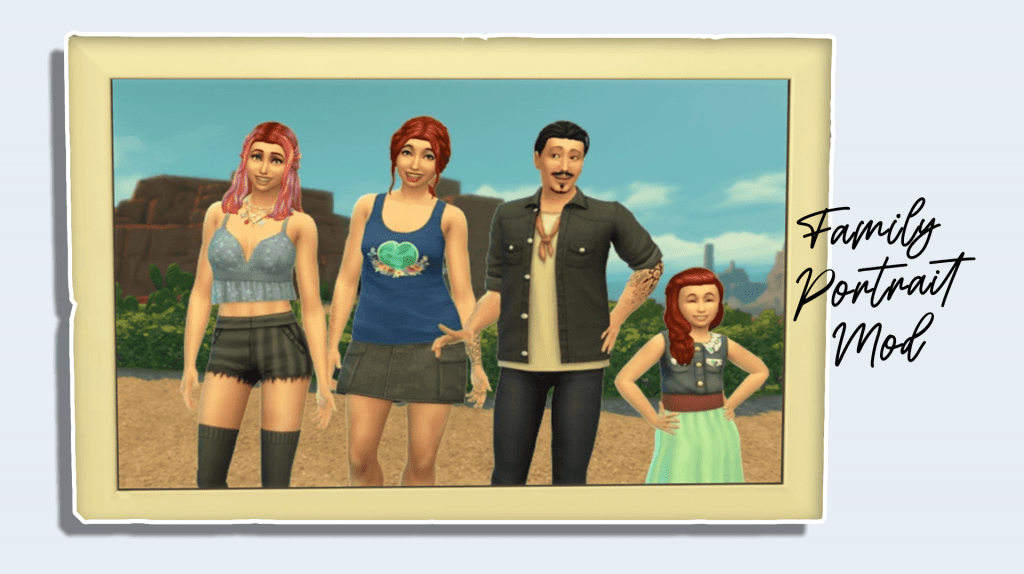
More on SNOOTYSIMS: Once you’re comfortable using Gallery Poses, you can have some real fun by combining them with the Family Portrait Mod for wonderful group and family photos!
Family Portrait Mod

Finding Gallery Poses

Gallery Poses, like any other type of CC for The Sims 4, are available all over the Internet. To get you started we recommend this Pinterest page by @thesims4shopper which has a variety of options, all organized by creature type, pose vibe, etc. It’s a fantastic resource if you’re just getting started and aren’t sure where to look!

Conclusion

When it comes to taking Household photos of your newly created sims, EA’s poses leave a lot to be desired. Using CC Gallery Poses allows you to refresh those stale family photos and give your household some real personality! If you’ve ever been curious about trying Gallery Poses or feel a little intimidated at the idea, this how-to should hopefully give you the confidence to give them a go. We hope you find the perfect poses for your sims, and that you don’t have to Randomize them too much to get everybody in position. Give Gallery Poses a try, have fun, and happy simming!


Follow SnootySims on Social Media:

Join us on our journey to discover the latest and finest Sims 4 custom content, as well as stay updated on news and rumors surrounding the highly anticipated Sims 5! 🌟

Our Latest Custom Content @ Patreon


Latest CC Finds @ SnootySims


FOR SIMS FANS, WITH LOVE ♥

We're on Patreon, too!

We've now shared 350+ CC packs on our Patreon. Find your next favorites — made with love for your Sims. ♥

Supporters also get a handy one-click download.

Discover our Patreon
FEATURED SIMS 4 CC · AMARA

A little Nordic warmth. 💚

Meet the NORDLYS Set: cozy furniture, soft textures and warm neutrals for your Sims’ homes.

Explore on Patreon Availability and download details on the creator’s Patreon.
SNOOTYSIMS

Privacy Policy

SNOOTYSIMS

Privacy Policy

Effective Date: October 2, 2026
Last Updated: October 14, 2026

1. Introduction

This Privacy Policy explains how SnootySims (SnootySims.com, the “Site,” “we,” “us,” or “our”) collects, uses and discloses personal information when you visit the Site, create an account, subscribe to emails or contact us. It also explains your privacy choices.

2. Information We Collect

We collect information you provide through account features, subscriptions and support requests. This may include your email address, display name, profile photo, preferences and the contents of your messages. Please do not send information that is not needed for your request.

Our Site and service providers may automatically receive your IP address, browser and device information, operating system, referring page, access times, pages viewed, searches, link or ad interactions, and cookie or device identifiers. An IP address may be used to infer approximate location. Advertising partners may derive interests or audience segments from browsing activity.

3. Account Information

We use Clerk for account creation, email/password authentication, sessions, account recovery and security. Account data may include your email address, internal account ID, display name, profile photo, account settings, authentication and password-reset information. If you choose Google sign-in, we receive the information you authorize Google to share.

We use this information to provide account features, recover access, respond to support requests and prevent fraud or abuse. If you use My collection, we store the CC items you save and your 20 most recent distinct searches with your account. You can remove favorites and clear your search history in My collection. These lists are private and are not published to other users. You can contact us to request deletion of all associated records. Account registration does not automatically enroll you in marketing emails.

4. Newsletter and EmailOctopus

If you separately subscribe, we may send newsletters, new Sims content, site updates and occasional promotional emails. Subscription is optional and is not required to create an account. Essential account, security and service emails are separate from marketing.

We use EmailOctopus to manage newsletters, with Amazon SES for delivery through EmailOctopus Connect. Subscriber information may include your email address, optional name, consent and subscription status, signup source and time, confirmation records, unsubscribe status, delivery information and technical information needed to send emails.

Where campaign tracking is enabled with any required consent, EmailOctopus may record email opens through tracking pixels and link clicks to help measure campaign performance. See the EmailOctopus Privacy Policy.

You can unsubscribe using the link in any marketing email or by contacting snooty@snootysims.com. We may keep limited suppression records to avoid sending further marketing or accidentally resubscribing you. Unsubscribing does not stop essential, non-promotional account or service messages.

5. How We Use Information

We use information to operate SnootySims, provide and secure accounts, recover access, answer requests, send subscribed communications, improve content and performance, understand site use, prevent fraud, meet legal obligations, and deliver and measure advertising, including personalized advertising where applicable.

6. Cookies and Similar Technologies

We and our providers may use cookies, local storage, pixels and similar technologies for sessions, security, preferences, analytics, advertising and ad measurement. For example, browser storage remembers site preferences and guest usage limits.

You can manage cookies through your browser and use privacy controls available on the Site. Blocking storage may affect account features or preferences. Raptive advertising controls apply to Raptive ads; they do not necessarily control every other service on the Site.

7. Analytics and Google Services

The Site uses Google Tag Manager to load configured tags. Where Google Analytics is enabled, it may process device and browser information, page views, referrals, session activity, approximate location and cookies or similar identifiers to help us understand site use and improve content. Google also processes information when you choose Google sign-in. See the Google Privacy Policy.

8. Advertising and Raptive

Advertising.

CMI Marketing, Inc., d/b/a Raptive (“Raptive”) is a service provider of this Site for the purposes of placing advertising on the Site, and Raptive will collect and use certain data for advertising purposes. To learn more about Raptive’s data usage, click here: Raptive Advertising Privacy Statement

Raptive and its partners may use cookies, device identifiers, IP addresses, browser information, browsing and ad activity, approximate location and inferred interests for personalized ads, measurement, analytics and fraud prevention. These disclosures may qualify as a “sale,” “sharing,” or “targeted advertising” under state privacy laws, even without exchanging a customer database for money.

9. Advertising Privacy Choices

For US visitors, Raptive supplies a “Do Not Sell or Share My Personal Information” control through its ad code, ordinarily at the bottom of the homepage or the first ad-supported page you visit. Use that control to manage Raptive advertising choices. If it is unavailable, contact us. Opting out does not remove all ads; contextual or non-personalized ads may still appear.

Browser-based choices may need to be repeated on other browsers or devices or after clearing cookies.

10. How We Disclose Information

Information may be disclosed to hosting, infrastructure, authentication, email, analytics and security providers to operate the Site; to Raptive and advertising partners for the purposes described above; when required by law or necessary to protect rights and security; and to parties involved in a merger, acquisition, financing or sale of business assets, subject to applicable law. Providers may process information outside your state or country, including in the United States.

11. US State Privacy Rights

Depending on your state of residence and whether the applicable law applies to SnootySims, you may have rights to confirm processing, access, correct or delete information, obtain a portable copy, and opt out of sale, sharing, targeted advertising or certain profiling. Where applicable, you may limit certain sensitive-information uses and appeal a denied request. We will not unlawfully discriminate against you for exercising these rights.

12. California Privacy Notice

This section applies to the extent SnootySims is subject to the California Consumer Privacy Act, as amended.

  • Identifiers: email addresses, IP addresses, account IDs and cookie or device identifiers.
  • Account information: profile details, preferences and authentication information, as applicable.
  • Internet activity: pages viewed, searches, clicks and Site or advertising interactions.
  • Approximate location: location inferred from an IP address.
  • Inferences: advertising interests or audience segments derived by advertising partners.

Sources include you, your browser or device, authentication services and advertising partners. We use and disclose these categories for the purposes and to the recipients described above. Advertising identifiers, online activity, approximate location and inferences may be sold or shared in connection with Raptive advertising.

Eligible California residents may request to know or access information, correct or delete it, opt out of sale or sharing, and limit certain uses of sensitive personal information where applicable. The reference to sensitive information describes a potential legal right, not a claim that we collect every sensitive category. Account authentication information is used to provide and protect accounts.

13. Exercising Your Rights and Account Deletion

Email snooty@snootysims.com to make a privacy request, request account deletion or appeal a decision. We may ask for information reasonably needed to verify your identity or an authorized agent’s authority. We respond within applicable legal time limits. Deletion may be subject to security, legal or other permitted exceptions.

Other applicable laws may also give you access, correction, deletion, portability, objection, restriction and complaint rights. You may withdraw consent for consent-based processing without affecting earlier lawful processing.

14. Global Privacy Control

Raptive states that its advertising systems recognize Global Privacy Control (GPC) as an opt-out signal. Qualifying GPC signals are treated as opt-out requests where applicable law requires. These browser-based advertising choices do not delete your account or unsubscribe you from emails. GPC is different from the older “Do Not Track” signal; we do not promise a uniform response to that older signal.

15. Retention and Security

We keep information for as long as reasonably necessary for the purposes described here, including providing services, security, legal compliance, resolving disputes, fraud prevention and respecting unsubscribe requests. After an eligible deletion request, information may be deleted or de-identified, subject to applicable exceptions.

We use reasonable administrative, technical and organizational safeguards. No storage or transmission system is completely secure.

16. Children’s Privacy

SnootySims is a general-audience site and is not directed to children under 13. Children under 13 should not create accounts or subscribe to newsletters. We do not knowingly collect children’s personal information in circumstances prohibited by COPPA. Contact us if you believe a child has provided such information.

Where applicable, sale or sharing of personal information of users known to be under 16 requires the authorization specified by law, including parental authorization for children under 13.

17. Third-Party Websites and Services

Links to downloads, creator websites, social networks and advertisements take you to services with their own privacy policies. Embedded content may also send information to its provider when loaded or used. We do not control those providers’ privacy practices.

18. Changes to This Policy

We may update this policy as our services or practices change. We will change the Last Updated date and provide additional notice or request consent where required by law.

19. Contact Us

SnootySims
Website: SnootySims.com
Email: snooty@snootysims.com

20. Premium Subscriptions and Payments

Premium-specific information updated October 14, 2026.

The service operator is identified in our Premium terms. Contact snooty@snootysims.com with account or privacy questions.

Account information

We use Clerk for registration and sign-in. Your email address and account identifier associate the subscription and access permissions with your account. See the Clerk Privacy Policy.

Payment processing

Stripe processes Premium payments and subscription billing. We send your account email and a subscription reference to Stripe to link payment to the correct account and prefill checkout. Stripe and your selected payment provider receive billing details, payment information, transaction details and technical information needed to process payments, calculate applicable taxes, authenticate payments, prevent fraud and meet legal obligations. Full card details are entered in Stripe’s payment form and are not stored by SnootySims. See the Stripe Privacy Policy. If you choose PayPal or another wallet, that provider’s privacy policy also applies.

Subscription access and support

We store customer and subscription identifiers, plan, payment and subscription status, billing-period information and account references to provide Premium access. We use support information to resolve access and billing issues and assist with cancellation or refunds. These uses support the requested subscription service, security and legal obligations. Records are kept as needed for these purposes and applicable recordkeeping requirements. Canceling renewal does not automatically delete your account or records we must retain.

Privacy requests

Email snooty@snootysims.com to request access, correction or deletion and exercise other applicable privacy rights. Requests about Stripe’s own processing can also be directed to Stripe using the contacts in its privacy policy.

Product & pricing · Premium terms · Refunds & cancellation

Open the full Privacy Policy ↗