The Sims 4 Update March 17 2026 brings exciting bug fixes, gameplay improvements, and more stability to your game. Here’s everything you need to know.
350 CC Items! Time to celebrate! 🎉
Before we begin: Thank you! We’re celebrating 3 years and 350+ CC items. As a gift, supporters can get all our free CC at once here: ALL IN ONE DOWNLOAD
The Sims 4 Update March 17 2026 is finally here, and it is packed with fixes that many of us have been waiting for. From annoying bugs to gameplay polish, this update feels like one of those quiet but impactful improvements that makes your day-to-day gameplay smoother.
If you have been dealing with weird Sim behavior or broken interactions lately, this patch might just be your new best friend.
Here is everything you need to know.
The Sims 4 Update March 17 2026 Patch Notes
Update: 3/17/2026
PC: 1.122.205.1030 / Mac: 1.122.205.1230
Sul Sul Simmers!
This update delivers The Sims 4Marketplace to PC and Mac players, with Console coming soon! It also includes more than 60 quality-of-life bug fixes and improvements, many of which address top-voted issues from the community. Alongside these fixes, we’ve made several adjustments to Sim autonomy, targeting behaviors such as Sims socializing with strangers, excessive flirting, and obsessively using certain objects.
Jump in, explore the Marketplace and enjoy The Sims 4 with a host of fixes and improvements designed to enhance your everyday gameplay experience!
Happy Simming!
–The Sims 4 Team
What’s New?
As mentioned, this release introduces the Marketplace to PC and Mac players, with Console coming soon! Fully integrated into The Sims 4, with curated collections and improved discovery tools to help you find the creations that match your playstyle. Learn more about Makers and all about the Marketplacehere!
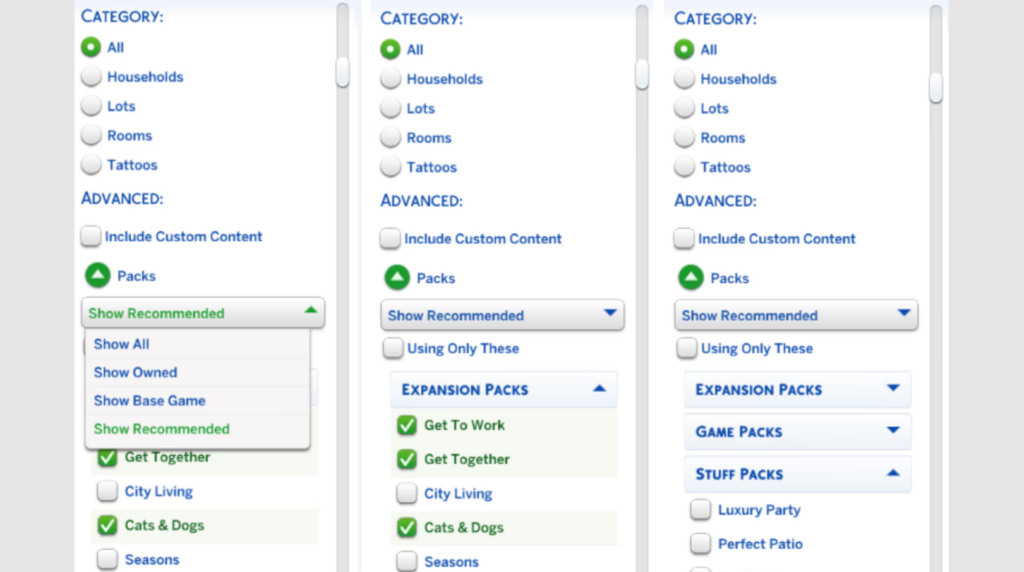
Pack Select has been relocated from the Game Options Menu and can now be found under My Collection within the Marketplace. It still allows you to select the content you want to play with in your Saved Game, as well as add the ability to manage the storage of your Marketplace downloaded content (which includes Marker Packs and newly purchased Kit content) directly from within the game.
This patch also marks the arrival of updates to Gallery discovery with improved filters for easier Gallery navigation!
Bug Fixes
Top 5 Most Voted Fixes:
[EA Forums][EA Forums] Extensive updates to ensure that Sims’ eye blinking will now show fully closed eyes for most interactions, see the blog postfor more information on these changes.
[EA Forums] Prom will once again appear on Calendars, and Sims will be able to attend. This fix will ensure it is working for both new and old saves. Alongside this fix, we fixed another issue where Prom goals weren’t able to be completed. (High School Years)
[EA Forums] We fixed an issue where Pet and Horse data was being lost in Premade Households. This issue will no longer occur in new saves. Existing saves where the issue already occurred will not be retroactively corrected. (Cats & Dogs, Horse Ranch)
[EA Forums] We’ve implemented a notable change to how Sims determine who they speak with on a lot. Now, Sims will generally prefer speaking with familiar Sims they already have a good rapport with, and Sims are less likely to engage with strangers spontaneously.
[EA Forums] Animals can be assigned to an Animal Shed after moving the Household to a new lot. They no longer become stuck in Household or Sim Inventory. This is also fixed for saves where the animals were already stuck. (Cottage Living)
Sims Autonomy Improvements
“Sim autonomy” is one of our Quality of Life Team’s key focus areas based on community feedback, and this update delivers on 3 of our top autonomy issues: Sims socializing with strangers, excessive flirting, and Sims using certain objects obsessively. We’ll continue to watch player feedback surrounding Autonomy for future updates.
Base Game
[EA Forums] We’ve addressed the issue where Sims were excessively flirting with each other.
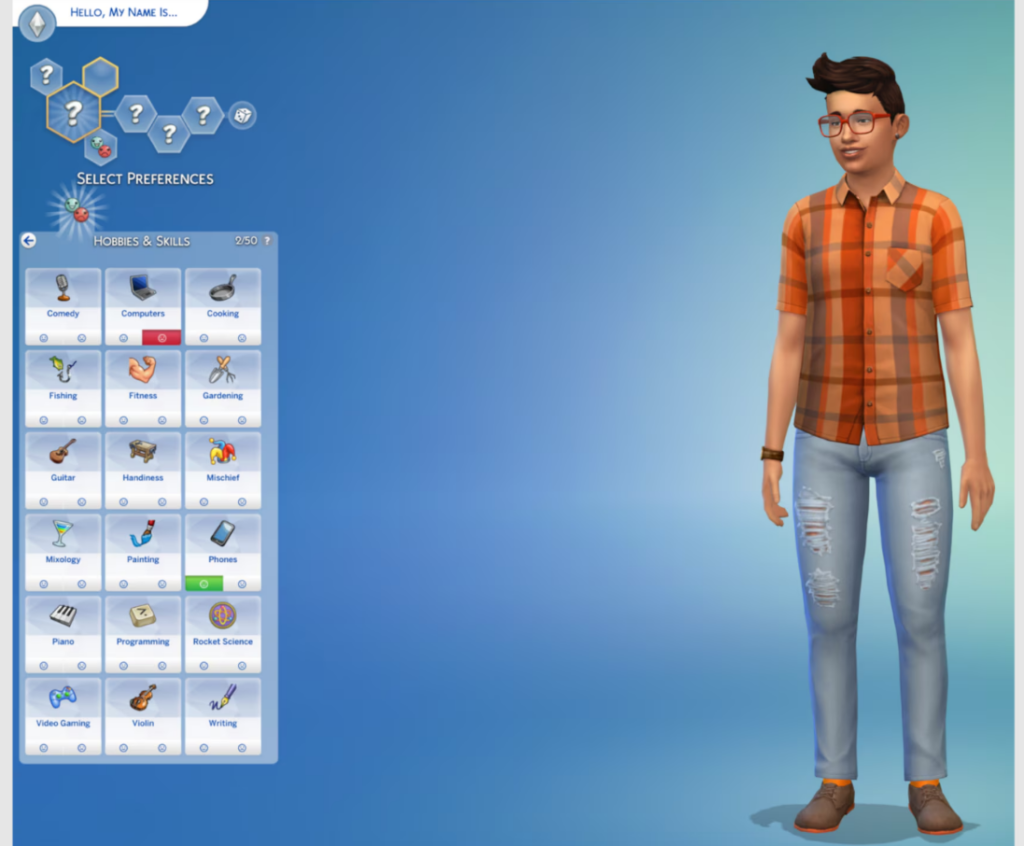
[EA Forums] We’ve heard your feedback and wanted to address Sims using Computers and Phones too often. We’ve added a few new preferences to the Base Game including: Likes Phones, Likes Computers, Dislikes Phones, and Dislikes Computers. If you don’t want your Sims to autonomously use these objects, please give them the “Dislikes Phones” or “Dislikes Computers” Preferences. If you’d like them to use these objects more often, select the appropriate “Likes” Preference.
[EA Forums] If a Sim autonomously uses the Phone, they will receive a cooldown on wanting to do this autonomously again for six Sim hours. This cooldown does not exist for non-active Household Sims, Teen Sims, or Sims who Like Phones. Sims who Dislike Phones (a new Preference we added) will never use them autonomously anymore.
[EA Forums] If a Sim autonomously uses the Computer, they will receive a cooldown on wanting to do this autonomously again for half of a Sim day. This cooldown does not exist for non-active Household Sims, Sims who are Geeks, Sims who Like Computers, or when it is a preferred interaction for Getaways, Clubs, Small Businesses, or Dynasties. Sims who Dislike Computers (a new Preference we added) will never use them autonomously anymore.
[EA Forums] The “Troll teh Forums” Computer Interaction has been added to the same cooldown that is used for other Computer interactions. Sims will also now need Mischief Skill Level 6 or higher to consider this action autonomously unless they have the following Traits: Evil, Childish, Geek, Hot-Headed, Erratic, or Mean (who always have it available). (Base Game)
[EA Forums] If a Sim autonomously destroys a Doll House, it will receive a cooldown on wanting to do this autonomously again for some time. We also made a change so that only Sims with certain Traits (Evil, Hates Children, Mean, Hot-Headed) will ever autonomously decide to destroy a Doll House while Angry. Before this update, this autonomous behavior could occur for any Sim who was feeling Angry or Dazed.
[EA Forums] If a Sim autonomously mixes a drink, they will receive a cooldown on wanting to do this autonomously again for a Sim day for non-NPCs. Previously this would occur frequently for Sims who were Inspired, or Sims with the Bro or Foodie Trait.
[EA Forums] If a Sim autonomously Swims, they will receive a cooldown on wanting to do this autonomously again for some time. This cooldown does not exist for non-active Household Sims, on Pool Venues, during Pool Party, or Birthday Party events, when Swimming is a preferred interaction for Getaways, Clubs, or Small Businesses, or if the Sim is a Merfolk or PlantSim.
[EA Forums] If a Sim autonomously plays the Violin, they will receive a cooldown on wanting to do this autonomously again for a Sim day. This cooldown does not exist for non-active Household Sims, for Sims who are Music Lovers, Sims who Like Violins, or when it is a preferred interaction for Getaways, Clubs, Small Businesses, or Dynasties.
[EA Forums] If a Sim autonomously plays the Guitar, they will receive a cooldown on wanting to do this autonomously again for a Sim day. This cooldown does not exist for non-active Household Sims, for Sims who are Music Lovers, Sims who Like Guitars, or when it is a preferred interaction for Getaways, Clubs, Small Businesses, or Dynasties.
[EA Forums] If a Sim autonomously plays Chess, they will receive a cooldown on wanting to do this autonomously again for a Sim day. This is for non-NPCs only, and not applicable during Clubs or Getaways involving Chess.
[EA Forums] We’ve added a cooldown for Sims dancing while on a lot that the Sim owns. Sims who Like Dancing, Dance Machine Trait Sims, and certain situations will not receive this cooldown. This cooldown is not for non-active Household Sims. This cooldown will disappear when Sims move lots in case they are going to a lot where they want to dance.
[EA Forums] We’re reducing how often a Sim considers turning on the Radio. Sims with the Music Lover trait will consider listening to music more often than other Sims.
[EA Forums] Though practically a staple of Sim culture (I’m being cheeky), we’ve added a cooldown for autonomous Push-Ups, Sit-Ups, and Stretches. Now, only Sims who are Energized at the Gym Venue or Sims with the Active trait will consider doing this autonomously.
[EA Forums] We’ve added a cooldown for Foodie Sims watching Culinary Training Videos on the Television where they won’t do this autonomously for two days after doing it.
[EA Forums] If a Child Sim autonomously uses the Space Ship Jungle Gym, they will receive a cooldown on wanting to do this autonomously again for a Sim day. This cooldown does not exist for non-active Household Sims or when it is a preferred interaction for Getaways, Clubs, or Small Businesses. Leaving the current lot also removes the cooldown.
[EA Forums] If a Sim autonomously plays with the Lump of Clay, they will receive a cooldown on wanting to do this autonomously again for a while. This cooldown does not occur for Creative Sims or Sims who Like Pottery.
Discover University
[EA Forums] If a Sim autonomously plays with the Soccer Ball they will receive a cooldown on wanting to do this autonomously again for a while. This cooldown does not occur for Sims who Like Fitness or non-Household Sims.
Cottage Living
[EA Forums] If a Sim autonomously does Cross-Stitch, they will receive a cooldown on wanting to do this autonomously again for some time. This cooldown does not exist for Sims who Like Cross-Stitching or when it is a preferred interaction for a Club.
Lovestruck
[EA Forums] Sims will no longer consider playing Who’s Up Party Games while in the middle of writing a Book on the Computer.
Adventure Awaits
[EA Forums] If a Sim autonomously plays with the Paper Airplane, they will receive a cooldown on wanting to do this autonomously again for a while. This cooldown does not occur for Sims who Like Papercrafting.
Spa Day
[EA Forums] If a Sim autonomously uses the Yoga Mat, they will receive a cooldown on wanting to do this autonomously again right away. This cooldown does not exist for High Maintenance Sims or Sims who Like Wellness. (Sims must be Wellness Skill Level 2 to Autonomously use a Yoga Mat – previously and still.) The cooldown is removed when leaving the lot, and when it’s the preferred interaction for Getaways, Clubs or Small Businesses.
Movie Hangout
[EA Forums] A cooldown has been added to the Popcorn Popper so that after it has been used by a Sim that Sim will not want to immediately use it again for some time.
Pet & Animal Fixes
With two of our Top Community Issues being around animals and pets, we fixed a few other bugs also in this category to provide a better overall experience with these systems.
[EA Forums] Animals in the Animal Shed, Chicken Coop, Mini Goats, and Sheep will no longer be multiplied. This was happening when these animals were placed into a Sim inventory, then back in the world, and after that the Sims moved their Household. (Cottage Living, Horse Ranch)
General Bug Fixes
We addressed a handful of other important issues that were quickly rising with player reports, particularly problematic in gameplay, or easy to fix.
Base Game
Sims with the Unflirty Trait will no longer get the ick when hugged.
Placing a painting on the wall and then returning it to the Sim’s Inventory will no longer result in a Simulation error.
Seasons
[EA Forums] Flowers will no longer get stuck midair while crafting a Flower Arrangement.
For Rent
[EA Forums] The “Do Inspection and Maintenance” interaction is now available on applicable working and broken objects in a Tenant Household for Landlord Sims. This should function both during Maintenance events and outside of them for Landlord Sims.
Life & Death
We’ve adjusted design elements on some of our swatches for the Ornate Mystery Rug which were ** concerning to some players.
Royalty & Legacy
[EA Forums] There was an issue where the updated Family Tree could cause wrong connections and overlapping which has now been fixed.
[EA Forums] We fixed a crash that could occur when resuming the game after deleting the Capp Household in Ondarion.
[EA Forums] Ondarion’s Verdemar lot is no longer reversed.
Parenthood
Child and Teen Sims who grew up in the same Household but weren’t related could get the Super Sibling relationship, despite not being related and then could later romance each other. Because we didn’t want to prevent stories where children could have possibly been in the same Household at one point while not related and end up in a relationship, we decided to fix this by renaming the relationships to Childhood Besties and Childhood Frenemy.
StrangerVille
There should no longer be a Script Call Fail error when the Plant Containment Cell is on the lot and the player tries to place other objects.
CAS & Build Mode Tagging Updates
We had the opportunity to address a large swath of simpler tagging bugs, making CAS and Build Mode sorting more accurate overall. Here are related issues we fixed:
Base Game
All Makeup that was in the Everyday category has been added to both Hot and Cold Weather Outfit category as a sorting option.
We’ve sorted 43 existing items under the Kids’ Decorations category.
Various lights (that were previously considered wall lights) have been sorted into the Lighting > Outdoor Lights in Build Mode category.
“Cute Critter Basket” is now sorted under Objects by Function > Kids > Kids’ Decorations.
Updated the swatch color for (yfMakeupLipstick_EF28GlossyLips_RedRuby) to appear more accurate.
(yfBottom_SDX040CCHSkirtPleated) will no longer appear for masculine frame Sims.
The Pencil Holder object has been additionally sorted into the Clutter category in Build Mode.
The “Wicker-Work Diaper Storage” object is now sorted under Objects by Function > Kids > Kids’ Furniture.
The “Bow, Bow, Bow!” object is now sorted under Objects by Function > Activities and Skills > Life Event Activities.
The “Martian Soil” wall pattern is now categorized under the Misc category rather than the Paneling in Build Mode category.
The “Sweetpea” and “Firehouse Brick” wall patterns are now sorted into Masonry and Siding.
Sycee of the Prosperous Moon, Right Side Up Gnome, and Bob the Butler Fancy Sculpture have been removed from their previous category and are now sorted under Decorations > Sculptures.
Multipack
We updated a large amount of love seats and benches to properly be identified as “Benches” for lot requirements when placed.
Lovestruck
We’ve adjusted the Lovestruck Beard swatches to display in the correct order.
(ymBottom_EP16Jeans) will now appear as a Masculine Fashion Choice in CAS filters.
Life & Death
“Perilous Paneling” and “Patterned & Perilous Paneling” now sort into the Paneling category, and “Lunar Reverie” sorts into the Wallpaper category.
Enchanted by Nature
“Wild Uncanny Cane” plant is now sorted in both Roof Sculptures and Outdoor Plants.
Backyard
(yfTop_SP08TeeBoatNeck_GradientPink) no longer sorts as Yellow in CAS filters.
Moschino
The “Libearian” bookshelf and the “I’m So Shiny!” surface have been removed from the Sculptures category.
Holiday Celebration
The “Kinara” and “Menorah” light objects are now sorted under Lighting > Table Lamps.
“Holiday Snowman” and “Pre-strung Tree of Lights” are now sorting under Lighting > Outdoor Lights.
Kitchen Clutter
All clutter items from the Kitchen Clutter pack are now visible when sorting by the pack filter and looking under the Misc Decorations category in Build Mode’s room view.
The Forever Friends Event
(ymTop_EV0641TankTwistBack_SolidBlackCyan) will no longer appear for masculine frame Sims.
The Nature’s Calling Event
Cove Stone – Round, Cove Stone – Flat, and Cove Stone Cluster objects are now sorted in the Outdoor Plants > Rocks category in Build Mode.
<Modder changelog>
Fixed Issue
Change Log
(ymBottom_EP16Jeans) will now appear as a Masculine Fashion Choice in CAS filters. (Lovestruck)
Added filter tag to asset (ymBottom_EP16Jeans).
(yfTop_SP08TeeBoatNeck_GradientPink) no longer sorts as Yellow in CAS filters. (Backyard Stuff)
Removed filter tag from asset (yfTop_SP08TeeBoatNeck_GradientPink).
Updated the swatch color for (yfMakeupLipstick_EF28GlossyLips_RedRuby) to appear more accurate.
Updated swatch icon color for asset (yfMakeupLipstick_EF28GlossyLips_RedRuby).
All Makeup that was in the Everyday Category has been added to both Hot and Cold Weather Outfit Category as a sorting option. This will make it easier than ever to do your makeup for these categories (since the options were previously hidden in many cases).
Added Hot and Cold Weather Tags to the base prototypes for all makeup assets. Removed Hot and Cold Weather Tags on a few specific assets that also did not have Everyday Category tags.
Animals can be assigned to an Animal Shed after moving the Household to a new lot. They no longer become stuck in Household or Sim Inventory. This is also fixed for saves where the animals were already stuck.Animals being unable to be assigned to the Animal Shed after moving was blocking another, older bug where Animals would become unresponsive after being assigned to the Animal Shed after moving. Since we fixed the first one, we also fixed this one alongside it.
Created a boolean tuning field ‘allow_transfer_out_of_hh_inventory’ that, when enabled, will allow an object in the HH inventory that cannot be directly placed in-world (eg. livestock animals) to be properly slotted to an in-world object. Enabled this boolean in the tuning for the loot action that slots livestock animals to their sheds.Modified the function that removes the animal shed object to return early if the shed is currently in the HH inventory (so the animal shed will not get erroneously unregistered from the animal service when moving HH)
Animals in the Animal Shed, Chicken Coop, Mini Goats, and Sheep will no longer be multiplied. This was happening when these animals were placed into a Sim inventory, then back in the world, and after that the Sims moved their Household.
Stopped tracking objects in the lost and found service if their location is currently in the Household Inventory (because they cannot be lost if they are in the HH inv).Properly set the livestock animals’ owner ID field in the python code after they are assigned to a shed (since livestock animals cannot be placed in-world they were bypassing the logic that normally sets that field, causing the Sim to not own them anymore after moving HH)
Sims will no longer consider playing Thumbs Up or the WooHoo Card Game while in the middle of writing a book on the computer.
Adding tests to autonomousSimPicker_TriviaBox_ThumbsUp_PlayWith and autonomousSimPicker_TriviaBox_WooWho_PlayWith to ensure Sims who are writing on the computer are not considered
Flowers will now longer get stuck midair while crafting a Flower Arrangement.
Set the Create Target Name of the arrangementTable_Passive Animation Element to be the in-progress craft arrangement. Also updated the VFX participant type in the outcome of the flowerArrangingTable_Arrange interaction to be CreatedObject instead of CraftingObject.
If a Child Sim autonomously uses the Space Ship Jungle Gym they will receive a cooldown on wanting to do this autonomously again for a Sim day. This cooldown does not exist for non-active Household Sims or when it is a preferred interaction for Getaways, Clubs, or Small Businesses. Leaving the current lot also removes the cooldown.
Adding a cooldown to autonomously running JungleGymBoat_Play and JungleGymRocketShip_Play
If a Sim autonomously uses the Yoga Mat they will receive a cooldown on wanting to do this autonomously again right away. This cooldown does not exist for High Maintenance Sims or Sims who Like Wellness. (Sims must be Level 2 to Autonomously use a Yogo mat – previously and still.) The cooldown is removed when leaving the lot, and when its the preferred interaction for Getaways, Clubs or Small Businesses.
Adding a cooldown to autonomously running si_Yoga_Practice and Yoga_Routine
We’ve heard your feedback and wanted to address Sims using Computers and Phones too often. When considering how to fix this, we felt there were stories to tell around Sims who can be a little obsessed about Phones and Computers and also Sims who do NOT like them and never want to use them! Because of that, we’ve added a few new preferences to the Base Game. These Include: Likes Phones, Likes Computers, Dislikes Phones, and Dislikes Computers. As their names imply, these new Preferences are particularly important now when determining how your Sim will (or won’t) engage with Computers and Phones. If you don’t want your Sims to autonomously use these objects, please give them the “Dislikes Phones” or “Dislikes Computers” Preferences. If you want them to be obsessed… you know what to do. Please enjoy!
Adding new Traits for phone and computer preferences. These are tested on the aptly named Phone and Computer super interactions.
In addition to the new Computer-related Preferences, if a Sim autonomously uses the Computer they will receive a cooldown on wanting to do this autonomously again for half of a Sim day. This cooldown does not exist for non-active Household Sims, for Sims who are Geeks, Sims who Like Computers, or when it is a preferred interaction for Getaways, Clubs, Small Businesses, or Dynasties. Sims who Dislike Computers (a new Preference we added) will never use them autonomously anymore.
Adding a cooldown to autonomously running autonomous-enabled Computer_Reacreation interactions, and the beloved Computer_TrollForum interaction
We’ve added a cooldown for Sims autonomously turning on the stereo to listen to music.
Adding a cooldown to autonomously running Stereo_AutonomousPickChannel as well as adding dancing cooldowns.
If a Sim autonomously destroys a Doll House it will receive a cooldown on wanting to do this autonomously again for some time. We also made a change so that only Sims with certain Traits (Evil, Hates Children, Mean Hot-Headed) will ever autonomously decide to destroy a Doll House while Angry. Before this update, this autonomous behavior could occur for any Sim who was feeling Angry or Dazed.
Adjusting tests and adding a cooldown to DollHouse_Smash
If a Sim autonomously does Cross-Stitch they will receive a cooldown on wanting to do this autonomously again for some time. This cooldown does not exist for Sims who Like Cross-Stitching or when it is a preferred interaction for a Club.
Adding a cooldown to autonomously running crossStitch_StartCrafting_Autonomously and craftingResume_CrossStitch
If a Sim autonomously mixes a drink they will receive a cooldown on wanting to do this autonomously again for a Sim day for non-NPCs. Previously this would occur frequently for Sims who were Inspired, or Sims with the Bro or Foodie Trait
Adding an autonomous cooldown to bar_StartCraftingAutonomously for Inspired/Foodie/Bro Sims.
If a Sim autonomously Swims they will receive a cooldown on wanting to do this autonomously again for some time. This cooldown does not exist for non-active Household Sims, on Pool Venues, during Pool Party or Birthday Party events, when Swimming is a preferred interaction for Getaways, Clubs, or Small Businesses, or if the Sim is a Mermaid or PlantSim.
Adding a cooldown to the fun motive advertisement on pool-swim_Autonomous_Start
If a Sim autonomously plays the Violin they will receive a cooldown on wanting to do this autonomously again for a Sim day. This cooldown does not exist for non-active Household Sims, for Sims who are Music Lovers, Sims who Like Violins, or when it is a preferred interaction for Getaways, Clubs, Small Businesses, or Dynasties.
Adding a cooldown to autonomously running interactions under Violin_NonTieredMenu and Violin_TieredMenu
If a Sim autonomously plays the Guitar they will receive a cooldown on wanting to do this autonomously again for a Sim day. This cooldown does not exist for non-active Household Sims, for Sims who are Music Lovers, Sims who Like Guitars, or when it is a preferred interaction for Getaways, Clubs, Small Businesses, or Dynasties.
Adding a cooldown to autonomously running interactions under Guitar_NonTieredMenu and Guitar_TieredMenu
If a Sim autonomously plays Chess they will receive a cooldown on wanting to do this autonomously again for a Sim day. This is for non NPCs only, and not applicable during clubs or getaways revolving around chess.
Adding an autonomous cooldown to Chess_PonderMoves, Chess_Social and Chess_Table_Social
We’ve added a cooldown for Sims dancing while on a lot that the Sim owns. Sims who Like Dancing, Dance Machine Trait Sims, and certain situations will not receive this cooldown. This cooldown is not for Non-Active Household Sims. This cooldown will disappear when Sims move lots in case they are going to a lot where they want to dance.
Adding a cooldown to autonomously running interactions like DanceFloor_Dance, Stereo_Dance and many others
Though practically a staple of Sim culture (I’m being cheeky), we’ve added a cooldown for autonomous Push-Ups, Sit-Ups, and Stretches. Now, only Sims who are Energized at the Gym Venue or Sims with the Active trait will consider doing this autonomously.
Adding a cooldown to autonomously considering sim_doPushUpsAutonomously, sim_doSitUpsAutonomously, Sim_doStretching, and Solo_WorkOut.
The “Troll teh Forums” Computer Interaction has been added to the same cooldown that is used for other Computer interactions. Sims will also now need Mischief Skill of 6 or higher to consider this action autonomously unless they have the following Sims Traits: Evil, Childish, Geek, Hot-Headed, Erratic, or Mean (who always have it available).
Adding a cooldown to autonomously running autonomous-enabled Computer_Reacreation interactions, and the beloved Computer_TrollForum interaction. The Troll Forum interaction also received a test restructure for its availability.
A cooldown has been added to the Popcorn Popper so that after it has been used by a Sim that Sim will not want to immediately use it again for some time.
Adding a cooldown to PopcornPopper_StartCooking_Autonomously
We’ve added a cooldown for Foodie Sims watching Culinary Training Videos on the television where they won’t do this autonomously for two days after doing it.
Adding an autonomous cooldown on tv_WatchCooking_CulinaryTraining for Foodie Sims
Placing a painting on the wall and then returning it to the Sim’s inventory will no longer result in a Simulation error.
Objects duplicated between world and inventory will be discarded from inventory on load
• We did extensive updates to ensure that Sims’ eye blinking will now show fully closed eyes for most interactions.• High-impact animations—such as blinking in CAS, sleep loops, kissing, and looking down at a phone—were given extra focus to ensure eyes fully close.• In some rare cases, some eye sets may experience slight over-blinking due to their shape—which was preferred to consistent under-blinking across most eye shapes.• We did a lot of work to provide the best visual experience for eyes closing with upper and lower eyelashes slotted for a Sim:• The most noticeable interactions for players received special attention to minimize any clashing between eyelashes.• High-impact animations—such as blinking in CAS, sleep loops, kissing, and looking down at a phone—were given extra focus to ensure eyelashes don’t clash.• Upper and lower eyelash clashes may still occur with certain eye shapes and less noticeable interactions. We did our best to minimize this issue.• Lower lashes now move along with the lower eyelid.Unusual brow movements during some sleep loops will be fixed. This was tied to certain mood animations partially being played while a Sim was sleeping.
The Cantina High Top Tables object now has a price of $550 Simoleons, rather than $0.
Updated price in tuning
Prom will once again appear on Calendars and Sims will be able to attend. This issue was occurring in old saves created prior to a previous Prom-related fix, but this fix will ensure it is working for both new and old saves.
When scheduling prom, we were testing for any early graduate Sims, but the Tests would always fail on older saves. Moved those tests to when prom is run.
We fixed an issue where Prom goals weren’t able to be completed.
Updated score multiplier test to return a default value instead of throwing an error when running on simless events.
We’ve implemented a notable change to how Sims determine who they speak with on a lot. With these changes, we hope to make Sims feel a bit smarter when it comes to socialization. Now, Sims will generally prefer speaking with familiar Sims they already have a good rapport with, and Sims are less likely to engage with strangers spontaneously. On top of this, they’ll also factor in distance before choosing a Sim to talk to. Our intention is that it’ll be less likely for stranger Sims to push into a conversation between friends but not outright remove Sims wanting to get to know one another. Likewise, we didn’t want Sims charging across the lot to start a conversation, and Sims should no longer be psychically targeting another Sim for socialization over great distances. Paired together, we feel this update makes Sim socialization feel less disruptive, more appropriate, and generally much more enjoyable.
Adding a new aggregate interaction (aggregate_SocialObservation_Chat) to determine the proper Sim to run SocialPickerSI on.
We fixed an issue where Pet and Horse data was being lost in Premade Households. This will no longer occur in fresh saves. However, if this occurred in an old Save, it will still be occurring in that instance.
Re-exported premade household info with pets in game.
“Perilous Paneling” and “Patterned and Perilous Paneling” now sort into the Paneling category, and “Lunar Reverie” sorts into the Wallpaper category.
Removed WallPattern_Paint tag from assets (Panel02RR), (Panel01RR) and (Painted02MODERN_WSTR) wall patterns. Added WallPattern_Wallpaper tag to (Painted02MODERN_WSTR) wall pattern, and WallPattern_Paneling to (Panel02RR) and (Panel01RR).
All clutter items from the Kitchen Clutter pack are now visible when sorting by the pack filter and looking under the Misc Decorations category in Build Mod’s room view.
“Wild Uncanny Cane” plant is now sorted in both Roof Sculptures and Outdoor Plants.
Added Build_Shrub and Build_Shrub_Bush tags to (plantLot1x1_EP19GENsharpLeaf). Also added Build_Flower and Build_Flower_GroundCover tags to (plantLot1x1_EP19GENwisp).
“Cute Critter Basket” is now sorting under Objects by Function > Kids > Decorations.
Added BuyCatLD_KidsDecoration tag to (sculptTableLarge_EF48GENanimalBasket) and (sculptTableLarge_EF48GENtoyBasket).
“Holiday Snowman” and “Pre-Strung Tree of Lights” are now sorting under Lighting > Outdoor Lighting.
Added BuyCatLD_OutdoorLight tag to (lightOutdoorFloor_FP01GENdeadTreeHoliday) and (sculptFloor1x1_FP01GENholidaySnowman).
The “Libearian” bookshelf and the “I’m So Shiny!” surface have been removed from the Sculptures category.
Removed BuyCatLD_Sculpture tag from (bookcaseSurface_SP15GENbooks) and (pedestal_SP15GEN).
The “Kinara” and “Menorah” light objects are now sorting under Lighting > Table Lamp.
Removed BuyCatLD_MiscDecoration from (lightTableCandle_FP01GENkinara) and (lightTableCandle_FP01GENmenorah) and added BuyCatLD_TableLamp to both items.
Sims with the Unflirty trait will not longer get the ick when hugged. Just because you’re Unflirty, doesn’t mean you don’t enjoy the occasional hug.
Removing Unflirty tested outcomes from Mixer_social_Hug_targeted_Friendly_MiddleScore
The “Do Inspection and Maintenance” interaction is now available on broken objects in a Tenant Household for Landlord Sims.
Fixing a test on landlordTenant_DoInspectionMaintenance
The Cove Stone – Round, Cove Stone – Flat, and Cove Stone Cluster objects are now sorted in the Outdoor Plants > Rocks category in Build Mode.
Removed BuyCatLD_MiscDecoration tag from (rockLot1x1_EF63EVRclustersRound), (rockLot1x1_EF63EVRclustersShort), and (rockLot1x1_EF63EVRclustersTall).
(yfBottom_SDX040CCHSkirtPleated) will no longer appear for masculine frame Sims.
Marked RestrictCrossGender on (yfBottom_SDX040CCHSkirtPleated)
The Pencil Holder object has been additionally sorted into the Clutter Category in Build Mode. It was afterall the icon for the Clutter Category!
Added BuyCatLD_Clutter tag to (sculptTableGENTeenPencilHolder).
Child and Teen Sims who grew up in the same Household but weren’t related could get the Super Sibling relationship, despite not being related and then could later romance each other. Because we didn’t want to prevent stories where children could have possibly been in the same Household at one point while not related and end up in a relationship, we decided to fix this by renaming the relationships to Childhood Besties and Childhood Frenemy.
Renamed some relbits and supporting descriptions in Parenthood.
The “Wicker-Work Diaper Storage” object is now sorting under Objects by Function > Kids > Kids Furniture.
Replaced BuyCatLD_MiscDecoration tag with BuyCatEE_KidFurniture tag on (sculptFloor_EF48GENdiaper).
The “Bow, Bow, Bow!” object is now sorting under Objects by Function > Activities & Skills > Life Events.
Added BuyCatEE_LifeEventActivity tag to (sculptTableMedium_SDX002GENholidayBow).
The “Martian Soil” wall pattern is now categorized under the Misc category rather than the Paneling Build Mode Category.
Various lights (that were previously considered wall lights) have been sorted into the Lighting > Outdoor Lights Build Mode Category.
Removed BuyCatLD_WallLight tag from (lightOutdoorWallSGHigh), (lightOutdoorWallSGLow), (lightOutdoorWallSGMed), (lightWall_EP02PUBLIC), (lightWall_EP05GEN), (lightWall_EP11GENiron), (lightWall_SP10GENarrow), (lightWall_SP10GENmetal), (lightWallGFVerticalBars), (lightWallQA_01), (lightWallQA_07), and (lightWallQA_10). Also added BuyCatLD_OutdoorLight tag to all these assets.
(ymTop_EV0641TankTwistBack_SolidBlackCyan) will no longer appear for masculine frame Sims.
Removed GenderMale tag on (ymTop_EV0641TankTwistBack_SolidBlackCyan)
If a Sim autonomously plays with the Lump of Clay they will receive a cooldown on wanting to do this autonomously again for while. This cooldown does not occur for Creative Sims or Sims who Like Pottery.
Adding a cooldown to ClayBlob_Mold
If a Sim autonomously plays with the Paper Airplane they will receive a cooldown on wanting to do this autonomously again for while. This cooldown does not occur for Sims who Like Papercrafting.
Adding a cooldown to super_Papercraft_PaperAirplane_Self_Throw_AutonomousOnly, super_Papercraft_PaperAirplane_Self_ThrowAround, super_Papercraft_PaperAirplane_Throw and super_Papercraft_PaperAirplane_Throw_FromInventory
If a Sim autonomously plays with the Soccer Ball they will receive a cooldown on wanting to do this autonomously again for while. This cooldown does not occur for Sims who Like Fitness or non-Household Sims.
Adding a cooldown to AutonomousObjectInInventory_SoccerBall and AutonomousObjectPicker_SoccerBall interactions
We’ve addressed the issue where Sims were excessively flirting with each other. This was occurring for players who did not own Adventure Awaits due to an issue with how a rule for Getaways was set up.
Fixing a test on Socials_Romance_STC which governs autonomous tests for all romantic mixer socials
The (wall_V_Clapboard02SGBrick_NT_PeachWhiteBrick) and (wall_V_Clapboard02SGBrick_NT_BlueRedBrick) wall patterns are now sorting into Masonry and Siding.
Added (WallPattern_Mansory) and (WallPattern_Sidding) to the tags
The Sycee of the Prosperous Moon, Right Side Up Gnome, and Bob the Butler Fancy Sculpture have been removed from their previous sorting category and are now sorted under Function > Decorations > Sculptures.
We updated a large amount of love seats and benches to properly be identified as “Benches” for lot requirements when placed.
Added Venue_Object_Bench, BuyCatSS_OutdoorBench, BuyCatSS_OutdoorSeating, and BuyCat_Venue_Park tags and removed BuyCatSS_OutdoorChair and Venue_Object_Chair tags from various loveseats.
We’ve updated some of the swatches for the Ornate Mystery Run which had designs that could resemble some inappropriate symbology.
Updated some swatch variant textures for (rug3x3_EP17GENskull).
There should no longer be a Script Call Fail error when the Plant Containment Cell is on the lot and the player tries to place other objects.
Added state smallBusiness_OpenClose_close to object_RetailPedestal (the tuning file for the Plant Containment Cell)
We’ve sorted many existing items under the Kids Decoration category.
One of the best parts about The Sims 4 Update March 17 2026 is how noticeable the changes are during normal gameplay.
Sims should now act more consistently when performing interactions, and certain frustrating glitches that could break immersion have been cleaned up. Whether you are managing a household, building relationships, or just letting your Sims live their lives, things should flow more naturally now.
This patch also continues EA’s effort to respond directly to community feedback, which is always a good sign for future updates.
A Step Toward a More Stable Sims Experience
While this update may not introduce new features or content, it plays an important role in keeping the game stable and enjoyable.
Fix-focused patches like this one help lay the groundwork for future updates, expansions, and even mod compatibility. And let’s be honest, a smoother game is something every Simmer can appreciate.
Final Thoughts
The The Sims 4 Update March 17 2026 might not be the most dramatic update, but it is definitely one worth installing right away. These behind-the-scenes improvements can make a huge difference in your everyday gameplay experience.
If you have been waiting for certain bugs to be fixed, now is a great time to jump back in and see how things feel. Stay tuned to SnootySims for more updates, and keep an eye out for future patches that continue to shape the game we all love.
Join us on our journey to discover the latest and finest Sims 4 custom content, as well as stay updated on news and rumors surrounding the highly anticipated Sims 5! 🌟