Get ready, Simmers! The biggest base game update of The Sims 4 is now here! Let’s take a look of what’s new and what’s been fixed in the latest game update.
350 CC Items! Time to celebrate! 🎉
Before we begin: Thank you! We’re celebrating 3 years and 350+ CC items. As a gift, supporters can get all our free CC at once here: ALL IN ONE DOWNLOAD
Patch Day is it!
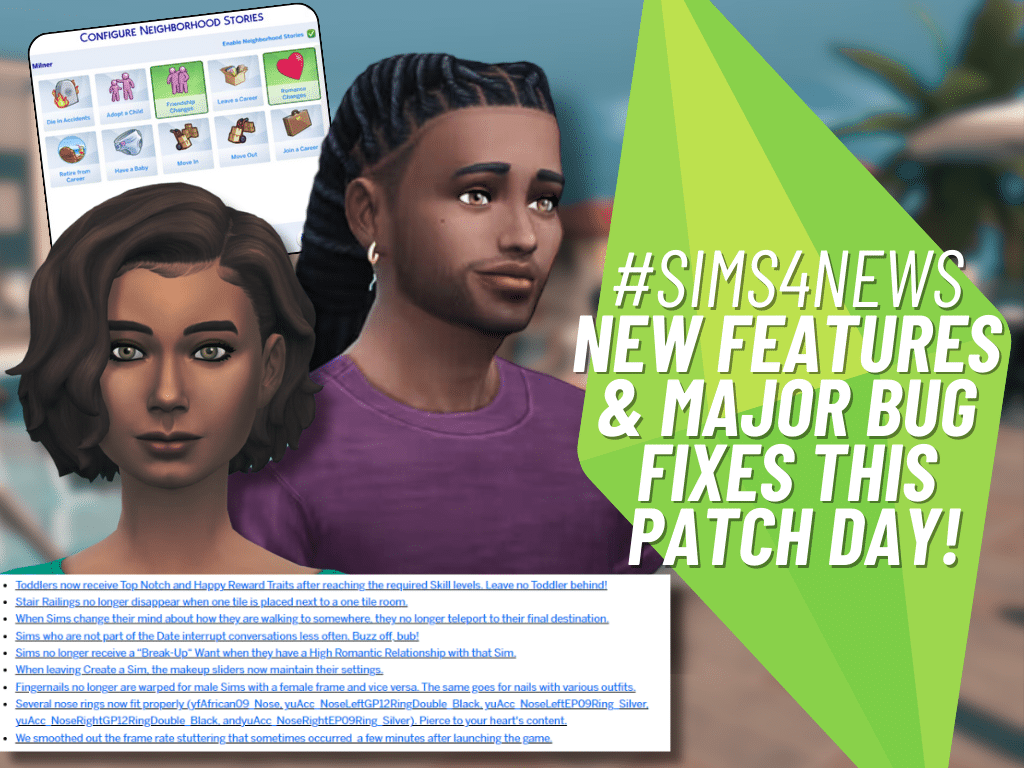
The Sims Team revealed the July Laundry List roughly two weeks ago, and now the patch day has arrived! With the latest updates, many major bugs have been fixed, and to our surprise, new game-changing features have been included! Remember the 60 bug issues? 60 bugs begone!
OOPS, A SIM-FRIENDLY WARNING FOR THE NEW PATCH UPDATE
To avoid losing your precious game progress in this new patch update, it’s a good idea to back up your files. Before you dive into that patch update, double-check to make sure all your mods and custom content are removed. We wouldn’t want you to accidentally lose your saved games, right? So, take a moment to safeguard your progress – it’s worth it!
Sims 4 New Patch Update Notes – July 23,2024
Update 7/23/2024
PC: 1.108.289.1030 / Mac: 1.108.289.1230
Console: 1.94
Sul Sul, Simmers! We’re lovestruck to share this abundance of new Base Game features and pack fixes!
What’s New in The Sims 4 ?
All for Love
Romantic Boundaries
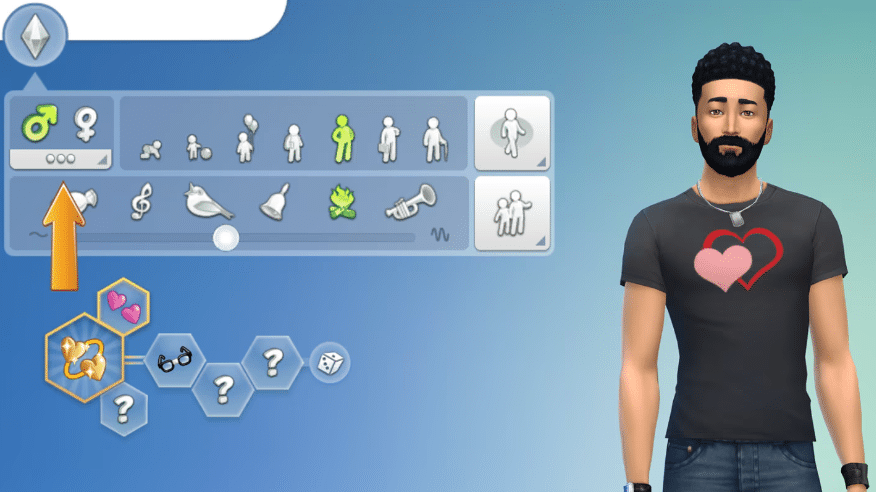
Real life relationships are nuanced and complex! Romantic Boundaries bring some of that into The Sims 4 by enabling you to define the conditions under which your Sims become jealous. These live in Create a Sim alongside the “Gender” and “Sexual Orientation” options in the Identity Panel and you can change them at any point in time.
Does your Sim become Jealous from Non-Physical Romance?Non-Physical Romance consists of social interactions that do not involve physical touch. Examples: flirting and complimenting appearance
Does your Sim become Jealous from Physical Romance?Physical Romance consists of socials that do involve physical touch. Examples: Kissing and holding hands
Does your Sim become Jealous from WooHoo?This applies to WooHoo for Young Adults and older and Mess Around for Teens.
Is your Sim open to changing the factors that cause them to become Jealous?“Yes” means the Sim can be asked in Live Mode to reconsider their feelings surrounding Jealousy for the settings above.
The defaults for all of these will be “Yes” for Sims in your existing games so that you can be the one to decide if you want different behavior. New Sims that the game makes can run the spectrum!
Hiding Relationships
As your Sims are dating or simply going about their daily lives, their Relationship Panel will accumulate more and more Sims. Tired of it being cluttered with random Sims that you met once and have no desire to meet again? Or have an ex that you want to scrub from your contacts? Well, good news! Now you can remove those Sims (who are not members of your household) by selecting them in the Relationship Panel and selecting “Hide Relationship”. Make room for the Sims who really matter!
Neutral Relationship Names
The language for Sims’ relationships now is more neutral to be more inclusive.
“Husband / Wife” → “Spouse”
“Fiancé / Fiancée” → “Engaged”
“Boyfriend/Girlfriend” → “Partner”
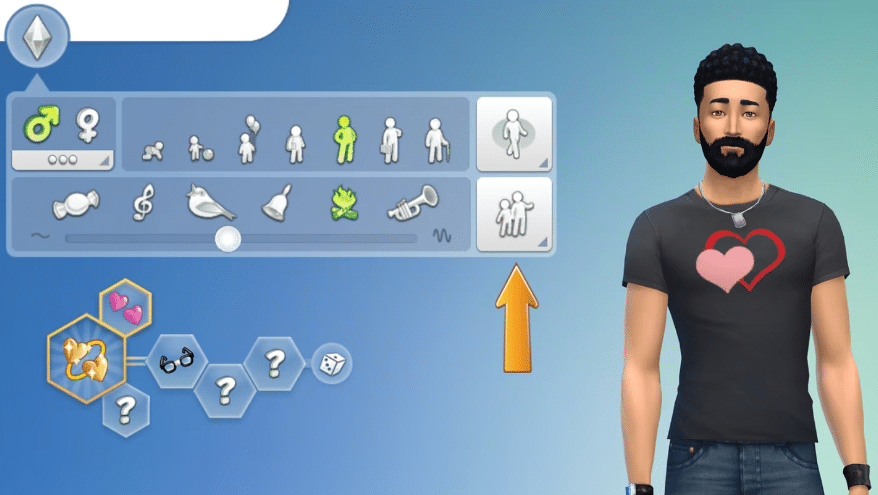
One place where you can see this is in Create a Sim. Select the “Identity” button (it looks like three dots) and go to the Household Relationships Panel.
Partner Status
Previously, the Partners relationship could only be established through gameplay. Now you can set it within Create a Sim between two Sims in your household!
Create a Sim
Eyelashes
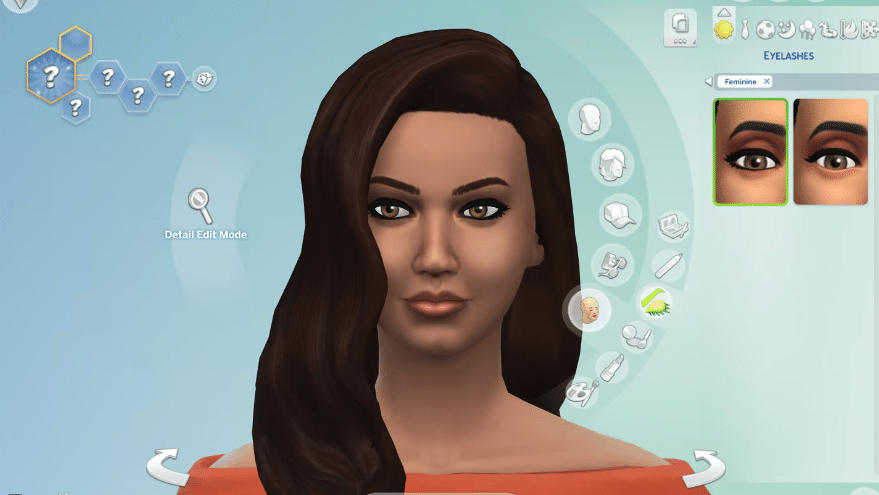
Eyelashes now have their own category! As you all know, some eye shapes have eyelashes as part of them. Now, Sims can have separate eyelashes applied independently from the shape of the eye! And since they are in their own category, they also are compatible with other accessories such as glasses and piercings. The base game includes two styles of lashes for a more dramatic look for your Sims! Seriously! It’s for everyone. For free. Today. Right now!
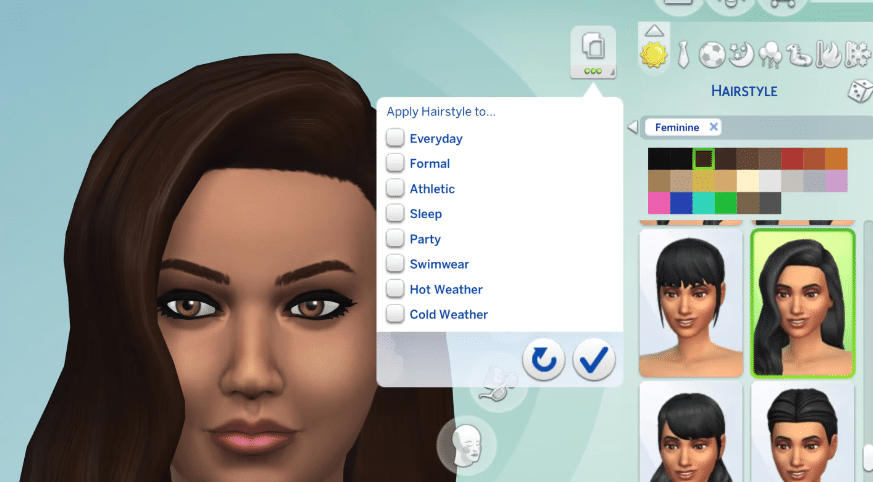
“Apply to All Outfits” Button
The days of manually finding and selecting the same accessory, makeup, hat, hair, top, bottom, full-body outfit, or footwear for each outfit are gone! Now you can hit this single button to apply the item to every outfit at once! Love that makeup look you just perfected in your Sim’s Everyday style? Now you can apply it to multiple categories! Found the perfect pair of pants for your party outfit, but applied it to Everyday by accident? You can also select specific categories to copy to, as well! This works on all ages and with all types of Occult Sims. We can’t believe it either. Is today the best day ever?!
Note: Currently, the Apply All Button adds the selected item to your Sim’s outfits. It does not remove outfit pieces – only adds or replaces.
We look forward to any feedback you might have on this new feature, so we can continue to improve it to meet your CAS needs in future releases!
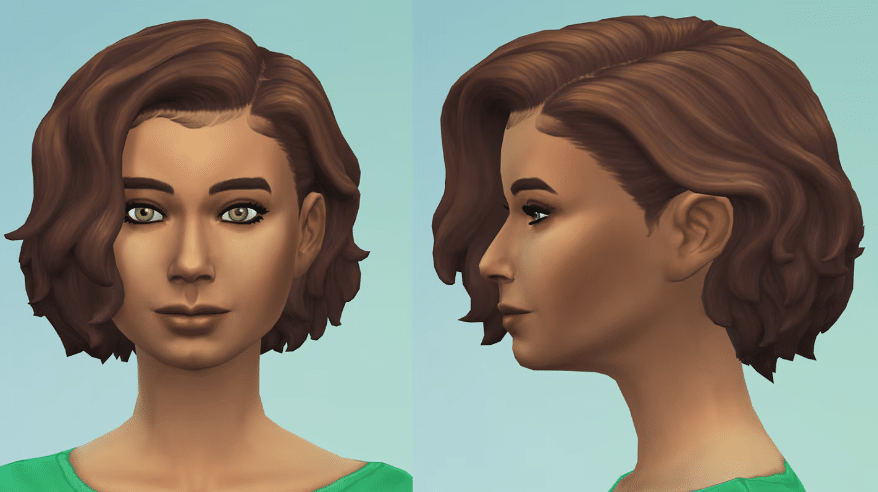
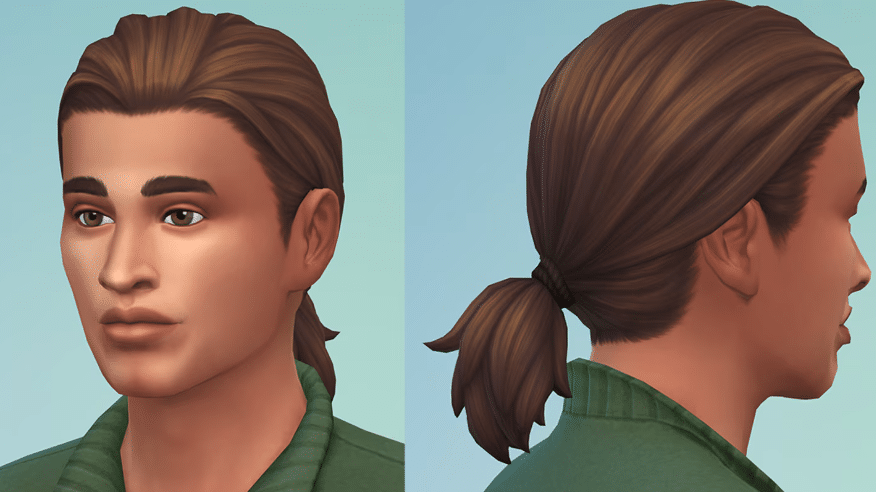
Updated Hairstyles
Is that a new hairstyle or are you just happy to see me? Yes, we are happy to see you and, yes, it is new hair!
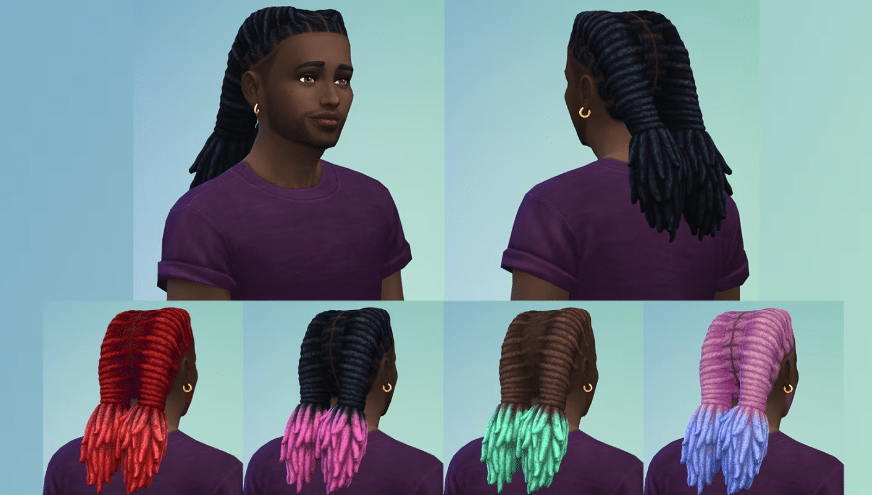
Dark and Lovely Hairstyle Partnership
And there’s even more hair! Part two of The Sims 4 collaboration with Dark and Lovely arrives in this update with two color variants of the new loc braids. Check out Dark & Lovely’s – Play In Color, a campaign that champions diversity and inclusion and spotlights the game changers who are redefining the rules in the games industry.
French Tips, Coffin Nails, and Neutral Palettes
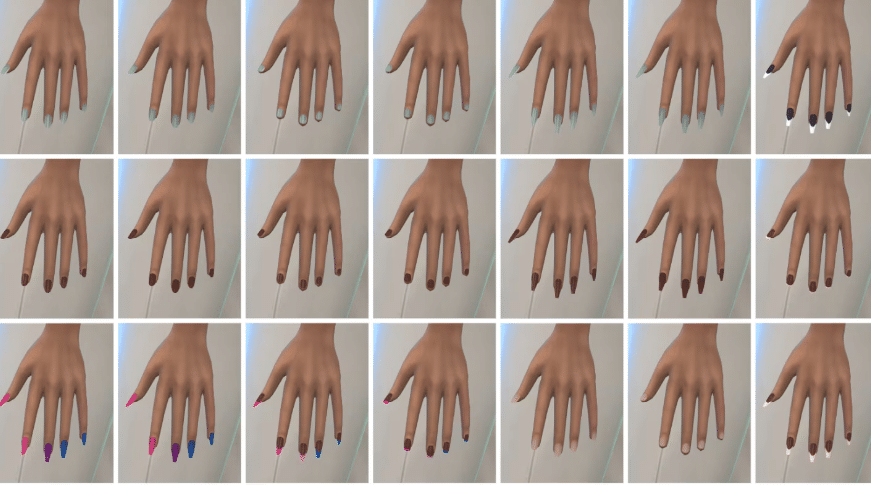
We’re excited to bring more nail styles and color palettes! There are new designs for French Tips and Coffin Nails to add flair to your fingertips. We’ve also added more color palettes for everyone to express themselves more freely! A whole new series of nude nails is also available to provide an extensive selection to match natural nail beds.
Build Mode: Curved Pools
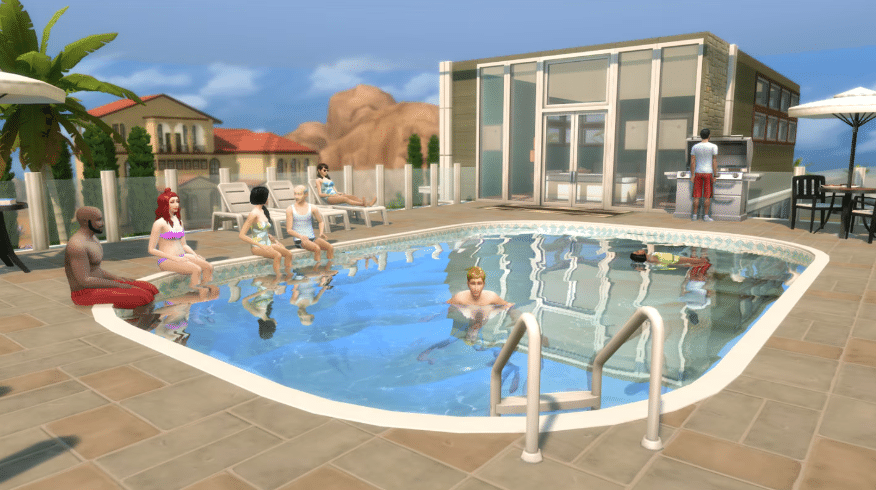
Now your pools can have rounded corners! Curved Pools work like Curved Walls—place a corner piece and adjust the sides. Mix and match with regular corners—let your imagination run wild! There also is a new pool light, Oblong Wall Light, that works perfectly on curved pool walls!
Live Mode
Relationship Interactions
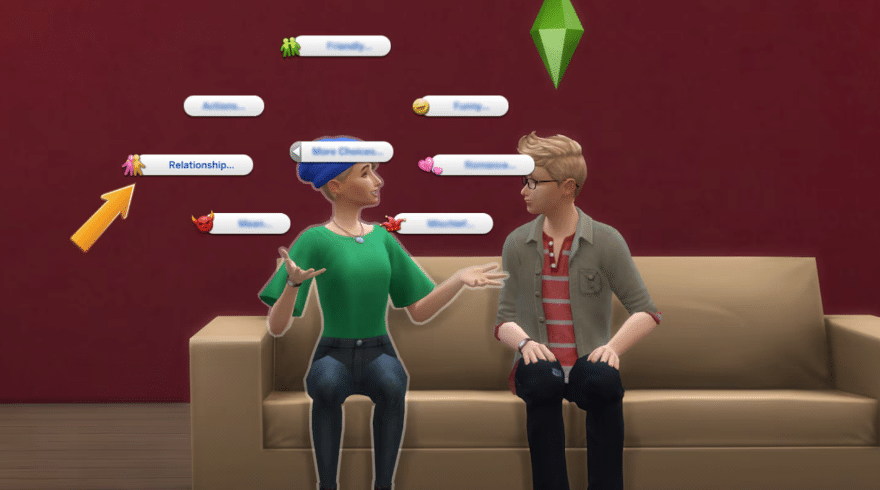
A new “Relationship…” category in the Interaction menu now contains actions across the Base Game and a number of packs that directly relate to relationship status such as “Ask to Join Household” or “Become Best Friends”.
Safe Music Streaming
The Music section of Game Options now has a “Safe for Steaming” toggle to play only the music that is safe for streaming The Sims 4! When this is checked, you don’t have to worry about your stream or video running into music copyright issues. We’ll be adding more music with streaming-friendly licensing as time goes on.
Neighborhood Stories
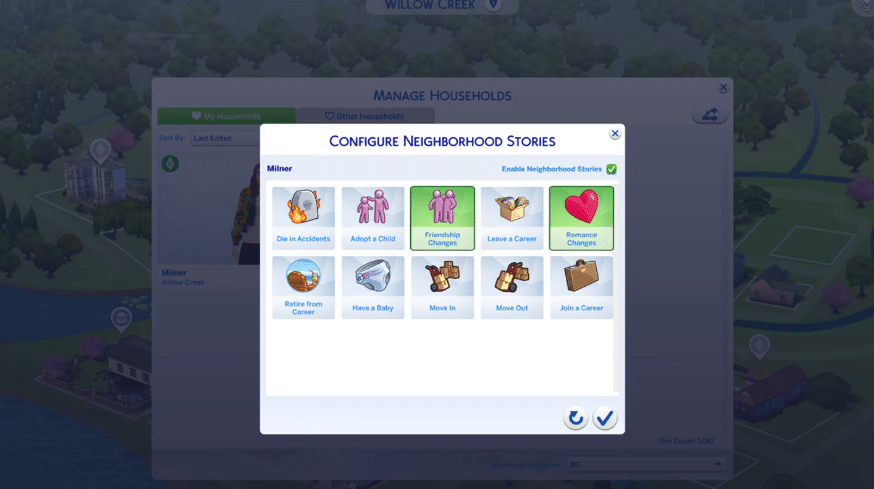
Neighborhood Stories now has two new options within Manage Households: Friendship Changes and Romance Changes. This enables Sims in other households to start and end those types of relationships on their own. You can use the mailbox each day to “Check Recent Neighborhood Stories” for news such as Sims your household knows becoming best friends, breaking up, or getting back together.
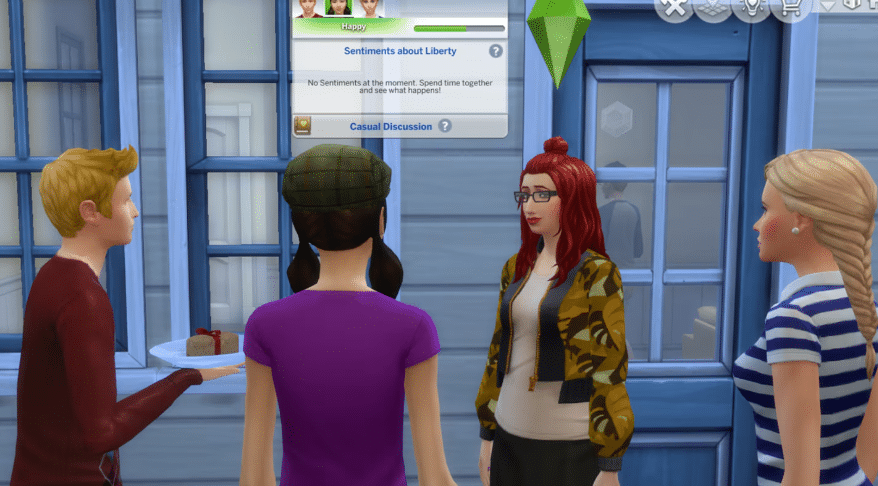
Conversation Panel
We gave a new coat of paint to improve the usability of that panel that appears at the top of the screen when your active Sim is in a conversation! Did you know you can do all these things with it?
Select the Sims’ portraits to see…
their mood
their relationship levels (regular and romantic) with your Sim
Select the book icon to see that Sim’s Sentiment with your Sim
Sims in a relationship will no longer receive unsolicited autonomous flirtations from other Sims, unless they have the Noncommittal Trait, of course.
Sims will Dance if the radio is turned on and playing music, but they’ll save their dance moves if the radio is turned off.
Enchanting and Flirty interactions are now only available for Sims who are compatible with the active Sim’s orientation.
Married Sims no longer receive a Want to flirt with Sims who are not their spouse.
Teen Sims will no longer feel jealous around a previous Teen romantic partner who has become a Young Adult.
Jealousy was getting ahead of itself! Those jealousy buffs were wrongly calling an engaged Sim a spouse. We’ve calmed things down and fixed the mix-up!
Upon learning a Sim’s WooHoo interest and opening their Sim Profile, the Sim Profile will no longer say “No One“ even when the sim has a WooHoo interest in Men/Women.
The Knowledge of a Sim’s Sexual Orientation and their Sim Profile will now remove outdated information when that Sim changes their Sexual Orientation in Create a Sim.
The need for fun won’t stop a Sim from enjoying their meal—they’ll finish eating before fulfilling their fun needs.
When multitasking two books being read, the Sim will no longer skip the first book. Now they will read it, put it away, and then go for the second book.
“Make a Move“ now is available between Sims whose marriage was established in Create a Sim.
If a Sim is rejected after asking another Sim on a date, a notification will be given on why they were turned down.
Ghost Sims are now available for “Ask on Date…“ from the Relationship Panel.
Both the Host Sim and the Sim’s date can contribute to the main date goal with one another. Before, only the Host Sim could accomplish the goal.
If a Sim heads off to work or school during an Event, the Event will come to an end. Duty calls!
Planning a Stay Over during an Event at the Sim’s home will bring the Event to a successful close. Time to kick back and relax!
If a Discovery Quest appears during an Event, the Event progress bar will not reset if the Discovery Quest is canceled.
If a Discovery Quest appears during an Event that has Goals and Rewards, your Sims now keep their Event titles and the progress remains visible.
Sims will be able to “Ask on Date…“ without the need for Romantic Relationship. That won’t stop Sims from rejecting the date proposal if things are off though.
When planning an Event, the Plumbob will appear next to the venue choices when scrolling through the available locations.
When planning an Event, the selected venue will appear at the top of the selection list if you navigate away and then back to the venue selection.
When planning an Event, Sims that are preselected will now count as a single entry rather than not being counted.
When planning an Event on console, the tooltip will now inform that a Sim is being changed from a Guest to a Hired Role. Additionally, a tooltip will appear if the Sim being hired for a Role has work scheduled during the Event.
When planning an Event on console, the location image will not appear in the description section of the planning page. Just the description text will appear.
When setting up an Event, the checkmark for each phase such as “Invite Sims” now is on the right side of the button for easier reading.
A Sim now can learn about another Sim’s financial status when they “Get to Know“ that Sim.
Lips are synced so that Sims making out keep their lips on their kissing partner. No more awkwardly talking mid-kiss!
When Sims get steamy in the shower from WooHoo, music now jazzes up the moment.
Sims in more restrictive costumes now kneel instead of sitting cross-legged.
Sims wearing the Hotdog costume will not intersect with their knees while kneeling on the ground.
“Skinny Dip with…“ no longer is available on pools when no other Sims are nearby.
The complete text for a joke falling flat now appears on failed comedy and funny socials, rather than getting cut off in the pop-up.
Mugs and tumblers fit better in Sims’ hands now.
Music will continue to play in Live Mode even if “Next Song“ is selected while the game is paused.
The highlight for newly acquired Sentiments that appears around a Sim’s portrait in the Relationship Panel is removed once the Sim profile is opened.
Unavailable actions in the Interaction menu are easier to read now.
Icons appearing with the music note have been fixed and are now playing in the right direction.
The text of phone call pop-ups now fills the space better.
Shadows no longer are checkered for some platforms.
Placing a lot from the Gallery no longer changes the color of the world on some platforms while the lot is building.
Pressing Alt + Tab in Fullscreen Mode on Windows now opens the Task Switcher for computers with DirectX 11.
Some interactions related to Sims being affectionate, sleeping in bed, reading books, going to other locations, and asking Sims on dates are more performant.
Answering incoming text messages works with both control method types on console (hovering or snapping the cursor).
The correct venue is highlighted in the venue selection when planning an Event from a Sim’s home lot on console.
Build Mode
Cellar stair trim no longer extrudes down to the basement floor when the basement floor is removed.
Walls directly under stairs now properly cut away in ”Walls Cutaway View.’
All “Mega Double Doors“ swatches now include transparent glass.
Bar Backs are included in the “Bars & Bar Backs“ category. Cheers!
When building Pools, Rotate and Copy no longer increase the cost of the Pool.
Large Curved Walls now can be placed on Large Curved Platforms.
Create a Sim
The ability to customize Toddler Toenails has returned. Look at those cute, colorful toesies!
Fingernails no longer clip through the gloves of full-body outfits.
French tip nails (ymAcc_ManiFrenchTip_Beige) have been manicured to no longer intersect with fingers.
Hair texture no longer changes when the Tank Top (yfTop_SDX021BinderRacerback) is applied to a female Sim.
The Simoleons thrown by Sims with the Materialistic Trait in Create a Sim now catch a little more air. Gotta show off the bucks with a bang.
The contrast and font color have been improved for better readability in the Styled Looks section of Create a Sim.
Gallery Server
Viewing creations from Followers should return results more quickly (internet speeds allowing) so you can get straight into browsing all of their shared creations.
Blocked players no longer show up in the Gallery searches.
Simmers on PlayStation and Xbox can see their Profile Showcase uploads in the Gallery again.
Get to Work
Scheduling Events from the Calendar while in Sixam no longer is available—seems like there’s no signal here!
Posing for a picture will look fabulous without creepy zombie teeth cutting into your face.
Sims will no longer ignore your desire to “Make Out with…“ when using the Get Together closets: Perfect Size Closet, Squaring it Square, and Fashionista’s Closet.
Pronouns on the notification for acquiring the Dance Skill and asking about another Sim are now correct.
City Living
Rounded decks, walls, platforms, pools, and fountains can now be placed in Apartments in San Myshuno.
Cats & Dogs
A Sim without the Cat Lover Trait who is watching the sky from the picnic table with another Sim who has that Trait will not spontaneously stare elsewhere besides their partner and the sky.
A Sim with the Cat Lover Trait will no longer slide in animations when sitting close with another Sim.
Interactions for collecting Cat and Dog hair piles are more performant. Every follicle counts!
Sim clothes will no longer remain on when entering Sim tattoo mode in Create a Sim after using Paint Mode or selecting Coat Colors & Patterns on Pets.
If acne is disabled in the Game Options, it will not appear on Sims in Live Mode.
The correct icons now appear in the Action Queue for “Admire Courage“, “Moving Too Fast“, and “Talk about Marriage“ rather than just showing the Sims face.
The Social Bunny icon now looks more social instead of romantic.
Once a Teen Sim becomes a Young Adult, the “Ask a Crush Out“ and “Chat with a Crush“ Wants are no longer available.
The light is back in Sims’ eyes with certain hairstyles (yfHair_EP12WavyFadeOmbre, ymHair_EP12WavyFadeOmbre, and ymHair_EP12WavyFade).
“Talk about Marriage“ now appears in the “Small Talk“ section of the Interaction Pie Menu and won’t always surface to the main Pie Menu interactions.
Benchmark Seating’s preview image now is pink when viewing the pink swatch. I can’t blame it, blue’s a great color.
Growing Together
Even if two Sims have amazing compatibility, romantic interactions won’t always be successful.
Haughty Herringbone Wall and Floor Tile’s color swatch for the gray version now matches instead of being black. Don’t mind it, it was just going through an emo phase…
Teen Sims will only have memories of “First Mess Around“ and will not confuse this with “First Woohoo.“ Teens will have to wait for adulthood for that.
Photobooth pictures will now fit nice and snug inside the Hodgepodge Photo Collage Frames.
The social compatibility icon has been improved in the Relationship Panel to better represent compatibility.
Horse Ranch
If a Sim leaves a conversation while mounted, they no longer blather on indefinitely.
Chestnut Ridge now shows its attractions when considering it for a Vacation. The tourism board wants you to visit for Dreadhorse Caverns, its rare fishing spots, and, of course, the horseback riding!
“Ask about Getting a Horse“ now shows the Friendly interaction icon in the Action Queue rather than showing the Horse Trainer’s face.
Up to eight Sims can enter the Equestrian Center instead of just one to spectate competitions—yeehaw!
If the computer is broken, Sims now have to repair it before they can purchase or rescue a Horse with it.
Horses move more smoothly and navigate more directly at Fast Speed and Ultra Speed.
Horses no longer teleport to their destination when trying to walk backwards in Fast Speed or Ultra Speed.
Foals turn around instead of sometimes going backwards to use objects.
Horses have lots of “locomotion” improvements! They travel more directly to their destination, slow down when going through gates, and stop more smoothly. They walk in and out of narrow spaces and gates (forwards and backwards!) more deftly.
Moreover, autonomous Horse movement is more performant.
Sims on Horses no longer socialize with Sims through walls.
For Rent
Residential Rentals are now available for Penthouse Lots! We were waiting for Residential Rentals to high-rise to the occasion and now they’re ready to be built to your specifications.
Households that do not use utilities such as power and water and owe zero Simoleons will not receive messages that threaten utility shutoff.
When the Property Owner is visiting a Tenant unit on the same residential property, the Sim Picker specifies “Visit Unit…“ rather than displaying “Go Home…“
Deleting and then undoing the deletion of a shared unit wall in a Residential Rental lot that has reached its maximum unit capacity will no longer cause issues with the “Create Unit“ functionality.
Visiting the Property Owner on the same residential property will no longer state that the Property Owner is not home—they can’t escape meeting you now!
Changing the name of the Penthouse Residential Rental will also be reflected in the Property Management Interface and the Lot Name headers.
“Sell Residential Rental“ is specifically used to avoid confusion with commercial businesses when selling residential property.
All versions of Oh So Floral, Oh So Fancy Tile now are shiny.
The Rent shown now is correct based on the unit size and amenities.
When renting a residential unit, a tooltip now specifies “Rent Unit“ before confirming the rental, similar to renting an apartment.
Tenants and Property Owners can now find each other in the Business filter of the Relationships Panel.
The ability to increase and decrease the panel height on console is now available for the Owned Business Panel.
The Unit Selection display for Residential Rentals in Manage Worlds now uses the D-Pad instead of L1/R1 (PlayStation) or LB/RB (Xbox) when changing floor level.
Neighborhood Sims now leave the restaurant after completing the eating of a grand meal and will no longer wait until the restaurant is closed.
Wearing the respectable shirt and vest combo (ymTop_GP03Vest) was cutting off circulation, causing a groove to appear around the Sim’s fingers. The cuffs have since been loosened and the Sim’s fingers are back to normal.
Vampires
Occult rank status for non-household occult Sims can now be seen in the Sim Profile.
Star Wars™: Journey to Batuu
For galactic safety, scheduling Events from the Calendar while in Batuu no longer is available.
We heard that you wanted the option to plan a wedding with the Base Game Wedding Event even when you have My Wedding Stories, so Sims now can choose between “Plan Wedding Event“ from Base Game or “Plan Customized Wedding Event“ from My Wedding Stories when they’re ready to get married.
Sims now stand instead of sitting on the floor from “Please Take Your Seats“ if there aren’t enough chairs.
Werewolves
The Sweater (ymTop_GP12SweaterDecal) no longer distorts at the arm for male Sims when viewing from a distance.
Crystal Creations
When a Sim wears jewelry crafted and charged with the Fire Opal crystal on a Date, completing date goals will count 50% more towards the Date’s score.
Bust the Dust
The “Filth Kills the Fun“ Moodlet now has a unique icon all its own, awww.
Sims no longer get multiple negative Dust Moodlets at the same time.
Industrial Loft
The preview image of the Johnny Zest’s Sweet Revenge Sofa faces the same direction as the other couches in Build Mode.
Urban Homage
The Track Pants (ymBottom_SP50Track and ymBottom_SP50Denim) are now correctly tagged as masculine.
Riviera Retreat
All Riviera Retreat rocks are included in the Rock category in Build Mode.
Essence of Bergamot Planter now exists fully in this realm (it was semi-transparent before).
With the new features and bug fixes, my favorite part will be the “Apply to All” button. It is surely a great help for CAS addict like me! Saving me some time to look for the items at once. How about you? What is your favorite new features from the patch? Did you already update your game to the new patch update? We’re eager to hear your thoughts, so please don’t hesitate to share your excitement and opinions by dropping a comment in the section below. We can’t wait to hear from you!
So SnootySims fam, keep updated about the new patch updates, news and announcements of The Sims 4 by regularly visiting this site! Plus, we are also on Facebook, Twitter, YouTube, Instagram, and TikTok, where you can follow and message us! Happy Spooky Day, Simmers!
Follow SnootySims on Social Media:
Join us on our journey to discover the latest and finest Sims 4 custom content, as well as stay updated on news and rumors surrounding the highly anticipated Sims 5! 🌟