The Sims 4 April 16 Update delivers important fixes and smoother gameplay for console players, improving the in-game marketplace experience.
350 CC Items! Time to celebrate! 🎉
Before we begin: Thank you! We’re celebrating 3 years and 350+ CC items. As a gift, supporters can get all our free CC at once here: ALL IN ONE DOWNLOAD
Sims 4 April 16 Update is officially here, and yes, this one comes straight from EA with some much-needed fixes that many Simmers have been waiting for. If you have been dealing with marketplace issues or frustrating console bugs, this update is aiming to clean things up in a big way.
Hey Simmers, this is one of those updates that may not add new content, but it makes your everyday gameplay feel so much better. And honestly, we love to see it.
This update delivers The Sims 4 Marketplace to PlayStation and Xbox, bringing Simmers access to Maker Packs and more.
On console versions of The Sims 4, we include Kits as part of the game files, so unlike PC/Mac, all the storage you can use will be for Maker Packs.
Storage on both PlayStation and Xbox is shared space for all Simmer accounts on the console.
On PlayStation 4 and PlayStation 5, Simmers will have access to 16GB of storage.
On Xbox One, Xbox Series X|S and Xbox Cloud, Simmers will have access to up to 50GB of storage. This storage increases as you use it, up to the maximum size.
When playing with Xbox Cloud Gaming, you may need to re-download your owned Maker Pack content at the start of a new session. This can be done through the Marketplace Download Manager before loading your Saves. Your Kits, Expansion Packs, Game Packs, and Stuff Packs will not need to be re-downloaded each session and can still be enabled or disabled within the Pack Select feature.
As well as bringing Marketplace to more platforms, we have addressed a number of issues reported on PC and Mac to improve the experience and stability which are available to all platforms which you can check out below.
Happy Simming!
– The Sims 4 Team
What’s New?
Base Game Update
[EA Forums] Pack content will no longer show as being deactivated after installing and will be enabled by default.
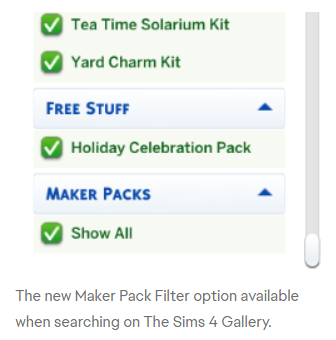
You can customize your Gallery experience even further by including or excluding Maker Packs with the new filter.
“Uses Items from These Packs” and “Show used items” sections in the Gallery now reflect what Maker Pack was used in a creation.
Create a Sim and Build Mode will now show the Golden Star icon for newly installed content from the Marketplace making your new purchases easier to find.
Deactivated packs will display their correct status in Load Game rather than showing as Not Owned.
Resolved an issue where the Moola Wallet wouldn’t update after a purchase.
Resolved an issue causing pack download status to display as “Failed” despite the download being successful.
“Connection Required” error should no longer appear after making multiple purchases in a row.
Maker names should now appear correctly for all Maker Packs.
Fixed an issue preventing the Browse page filters from being reset when the Marketplace was accessed from the Gallery.
Marketplace images should load correctly when Marketplace is accessed from the Gallery.
Resolved an issue where owned packs would show as “Not Owned” in the Load Save screen if the pack was deactivated.
Various UI scaling improvements for the Main Menu and Marketplace.
Console Updates
PlayStation and Xbox Simmers also get recent updates that PC and Mac Simmers have previously received.
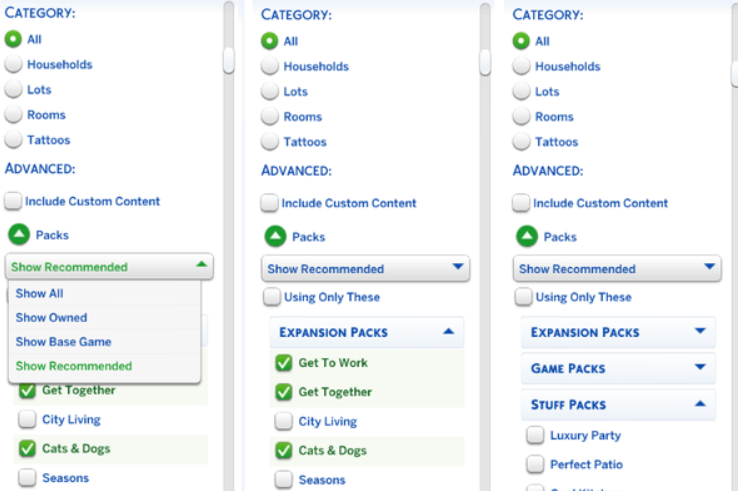
This patch also marks the arrival of updates to Gallery discovery with improved filters for easier Gallery navigation!
Bug Fixes
Top 5 Most Voted Fixes:
[EA Forums][EA Forums] Extensive updates to ensure that Sims’ eye blinking will now show fully closed eyes for most interactions, see the blog post for more information on these changes.
[EA Forums] Prom will once again appear on Calendars, and Sims will be able to attend. This fix will ensure it is working for both new and old saves. Alongside this fix, we fixed another issue where Prom goals weren’t able to be completed. (High School Years)
[EA Forums] We fixed an issue where Pet and Horse data was being lost in Premade Households. This issue will no longer occur in new saves. Existing saves where the issue already occurred will not be retroactively corrected. (Cats & Dogs, Horse Ranch)
[EA Forums] We’ve implemented a notable change to how Sims determine who they speak with on a lot. Now, Sims will generally prefer speaking with familiar Sims they already have a good rapport with, and Sims are less likely to engage with strangers spontaneously.
[EA Forums] Animals can be assigned to an Animal Shed after moving the Household to a new lot. They no longer become stuck in Household or Sim Inventory. This is also fixed for saves where the animals were already stuck. (Cottage Living)
Sims Autonomy Improvements
“Sim autonomy” is one of our Quality of Life Team’s key focus areas based on community feedback, and this update delivers on 3 of our top autonomy issues: Sims socializing with strangers, excessive flirting, and Sims using certain objects obsessively. We’ll continue to watch player feedback surrounding Autonomy for future updates.
Base Game
[EA Forums] We’ve addressed the issue where Sims were excessively flirting with each other.
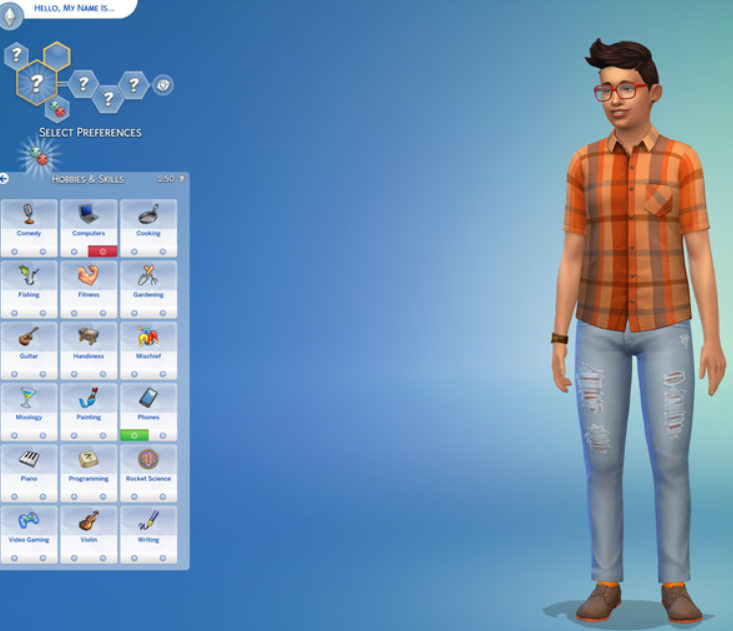
[EA Forums] We’ve heard your feedback and wanted to address Sims using Computers and Phones too often. We’ve added a few new preferences to the Base Game including: Likes Phones, Likes Computers, Dislikes Phones, and Dislikes Computers. If you don’t want your Sims to autonomously use these objects, please give them the “Dislikes Phones” or “Dislikes Computers” Preferences. If you’d like them to use these objects more often, select the appropriate “Likes” Preference.
[EA Forums] If a Sim autonomously uses the Phone, they will receive a cooldown on wanting to do this autonomously again for six Sim hours. This cooldown does not exist for non-active Household Sims, Teen Sims, or Sims who Like Phones. Sims who Dislike Phones (a new Preference we added) will never use them autonomously anymore.
[EA Forums] If a Sim autonomously uses the Computer, they will receive a cooldown on wanting to do this autonomously again for half of a Sim day. This cooldown does not exist for non-active Household Sims, Sims who are Geeks, Sims who Like Computers, or when it is a preferred interaction for Getaways, Clubs, Small Businesses, or Dynasties. Sims who Dislike Computers (a new Preference we added) will never use them autonomously anymore.
[EA Forums] The “Troll teh Forums” Computer Interaction has been added to the same cooldown that is used for other Computer interactions. Sims will also now need Mischief Skill Level 6 or higher to consider this action autonomously unless they have the following Traits: Evil, Childish, Geek, Hot-Headed, Erratic, or Mean (who always have it available). (Base Game)
[EA Forums] If a Sim autonomously destroys a Doll House, it will receive a cooldown on wanting to do this autonomously again for some time. We also made a change so that only Sims with certain Traits (Evil, Hates Children, Mean, Hot-Headed) will ever autonomously decide to destroy a Doll House while Angry. Before this update, this autonomous behavior could occur for any Sim who was feeling Angry or Dazed.
[EA Forums] If a Sim autonomously mixes a drink, they will receive a cooldown on wanting to do this autonomously again for a Sim day for non-NPCs. Previously this would occur frequently for Sims who were Inspired, or Sims with the Bro or Foodie Trait.
[EA Forums] If a Sim autonomously Swims, they will receive a cooldown on wanting to do this autonomously again for some time. This cooldown does not exist for non-active Household Sims, on Pool Venues, during Pool Party, or Birthday Party events, when Swimming is a preferred interaction for Getaways, Clubs, or Small Businesses, or if the Sim is a Merfolk or PlantSim.
[EA Forums] If a Sim autonomously plays the Violin, they will receive a cooldown on wanting to do this autonomously again for a Sim day. This cooldown does not exist for non-active Household Sims, for Sims who are Music Lovers, Sims who Like Violins, or when it is a preferred interaction for Getaways, Clubs, Small Businesses, or Dynasties.
[EA Forums] If a Sim autonomously plays the Guitar, they will receive a cooldown on wanting to do this autonomously again for a Sim day. This cooldown does not exist for non-active Household Sims, for Sims who are Music Lovers, Sims who Like Guitars, or when it is a preferred interaction for Getaways, Clubs, Small Businesses, or Dynasties.
[EA Forums] If a Sim autonomously plays Chess, they will receive a cooldown on wanting to do this autonomously again for a Sim day. This is for non-NPCs only, and not applicable during Clubs or Getaways involving Chess.
[EA Forums] We’ve added a cooldown for Sims dancing while on a lot that the Sim owns. Sims who Like Dancing, Dance Machine Trait Sims, and certain situations will not receive this cooldown. This cooldown is not for non-active Household Sims. This cooldown will disappear when Sims move lots in case they are going to a lot where they want to dance.
[EA Forums] We’re reducing how often a Sim considers turning on the Radio. Sims with the Music Lover trait will consider listening to music more often than other Sims.
[EA Forums] Though practically a staple of Sim culture (I’m being cheeky), we’ve added a cooldown for autonomous Push-Ups, Sit-Ups, and Stretches. Now, only Sims who are Energized at the Gym Venue or Sims with the Active trait will consider doing this autonomously.
[EA Forums] We’ve added a cooldown for Foodie Sims watching Culinary Training Videos on the Television where they won’t do this autonomously for two days after doing it.
[EA Forums] If a Child Sim autonomously uses the Space Ship Jungle Gym, they will receive a cooldown on wanting to do this autonomously again for a Sim day. This cooldown does not exist for non-active Household Sims or when it is a preferred interaction for Getaways, Clubs, or Small Businesses. Leaving the current lot also removes the cooldown.
[EA Forums] If a Sim autonomously plays with the Lump of Clay, they will receive a cooldown on wanting to do this autonomously again for a while. This cooldown does not occur for Creative Sims or Sims who Like Pottery.
Discover University
[EA Forums] If a Sim autonomously plays with the Soccer Ball they will receive a cooldown on wanting to do this autonomously again for a while. This cooldown does not occur for Sims who Like Fitness or non-Household Sims.
Cottage Living
[EA Forums] If a Sim autonomously does Cross-Stitch, they will receive a cooldown on wanting to do this autonomously again for some time. This cooldown does not exist for Sims who Like Cross-Stitching or when it is a preferred interaction for a Club.
Lovestruck
[EA Forums] Sims will no longer consider playing Who’s Up Party Games while in the middle of writing a Book on the Computer.
Adventure Awaits
[EA Forums] If a Sim autonomously plays with the Paper Airplane, they will receive a cooldown on wanting to do this autonomously again for a while. This cooldown does not occur for Sims who Like Papercrafting.
Spa Day
[EA Forums] If a Sim autonomously uses the Yoga Mat, they will receive a cooldown on wanting to do this autonomously again right away. This cooldown does not exist for High Maintenance Sims or Sims who Like Wellness. (Sims must be Wellness Skill Level 2 to Autonomously use a Yoga Mat – previously and still.) The cooldown is removed when leaving the lot, and when it’s the preferred interaction for Getaways, Clubs or Small Businesses.
[EA Forums] A cooldown has been added to the Popcorn Popper so that after it has been used by a Sim that Sim will not want to immediately use it again for some time.
Pet & Animal Fixes
With two of our Top Community Issues being around animals and pets, we fixed a few other bugs also in this category to provide a better overall experience with these systems.
[EA Forums] Animals in the Animal Shed, Chicken Coop, Mini Goats, and Sheep will no longer be multiplied. This was happening when these animals were placed into a Sim inventory, then back in the world, and after that the Sims moved their Household. (Cottage Living, Horse Ranch)
General Bug Fixes
We addressed a handful of other important issues that were quickly rising with player reports, particularly problematic in gameplay, or easy to fix.
Base Game
Sims with the Unflirty Trait will no longer get the ick when hugged.
Placing a painting on the wall and then returning it to the Sim’s Inventory will no longer result in a Simulation error.
Resolved an issue that caused a main menu message to appear more frequently than intended.
Seasons
[EA Forums] Flowers will no longer get stuck midair while crafting a Flower Arrangement.
For Rent
[EA Forums] The “Do Inspection and Maintenance” interaction is now available on applicable working and broken objects in a Tenant Household for Landlord Sims. This should function both during Maintenance events and outside of them for Landlord Sims.
Life & Death
We’ve adjusted design elements on some of our swatches for the Ornate Mystery Rug which were concerning to some players.
Royalty & Legacy
[EA Forums] There was an issue where the updated Family Tree could cause wrong connections and overlapping which has now been fixed.
[EA Forums] We fixed a crash that could occur when resuming the game after deleting the Capp Household in Ondarion.
[EA Forums] Ondarion’s Verdemar lot is no longer reversed.
Parenthood
Child and Teen Sims who grew up in the same Household but weren’t related could get the Super Sibling relationship, despite not being related and then could later romance each other. Because we didn’t want to prevent stories where children could have possibly been in the same Household at one point while not related and end up in a relationship, we decided to fix this by renaming the relationships to Childhood Besties and Childhood Frenemy.
StrangerVille
There should no longer be a Script Call Fail error when the Plant Containment Cell is on the lot and the player tries to place other objects.
CAS & Build Mode Tagging Updates
We had the opportunity to address a large swath of simpler tagging bugs, making CAS and Build Mode sorting more accurate overall. Here are related issues we fixed:
Base Game
All Makeup that was in the Everyday category has been added to both Hot and Cold Weather Outfit category as a sorting option.
We’ve sorted 43 existing items under the Kids’ Decorations category.
Various lights (that were previously considered wall lights) have been sorted into the Lighting > Outdoor Lights in Build Mode category.
“Cute Critter Basket” is now sorted under Objects by Function > Kids > Kids’ Decorations.
Updated the swatch color for (yfMakeupLipstick_EF28GlossyLips_RedRuby) to appear more accurate.
(yfBottom_SDX040CCHSkirtPleated) will no longer appear for masculine frame Sims.
The Pencil Holder object has been additionally sorted into the Clutter category in Build Mode.
The “Wicker-Work Diaper Storage” object is now sorted under Objects by Function > Kids > Kids’ Furniture.
The “Bow, Bow, Bow!” object is now sorted under Objects by Function > Activities and Skills > Life Event Activities.
The “Martian Soil” wall pattern is now categorized under the Misc category rather than the Paneling in Build Mode category.
The “Sweetpea” and “Firehouse Brick” wall patterns are now sorted into Masonry and Siding.
Sycee of the Prosperous Moon, Right Side Up Gnome, and Bob the Butler Fancy Sculpture have been removed from their previous category and are now sorted under Decorations > Sculptures.
Multipack
We updated a large amount of love seats and benches to properly be identified as “Benches” for lot requirements when placed.
Lovestruck
We’ve adjusted the Lovestruck Beard swatches to display in the correct order.
(ymBottom_EP16Jeans) will now appear as a Masculine Fashion Choice in CAS filters.
Life & Death
“Perilous Paneling” and “Patterned & Perilous Paneling” now sort into the Paneling category, and “Lunar Reverie” sorts into the Wallpaper category.
Enchanted by Nature
“Wild Uncanny Cane” plant is now sorted in both Roof Sculptures and Outdoor Plants.
Backyard
(yfTop_SP08TeeBoatNeck_GradientPink) no longer sorts as Yellow in CAS filters.
Moschino
The “Libearian” bookshelf and the “I’m So Shiny!” surface have been removed from the Sculptures category.
Holiday Celebration
The “Kinara” and “Menorah” light objects are now sorted under Lighting > Table Lamps.
“Holiday Snowman” and “Pre-strung Tree of Lights” are now sorting under Lighting > Outdoor Lights.
Kitchen Clutter
All clutter items from the Kitchen Clutter pack are now visible when sorting by the pack filter and looking under the Misc Decorations category in Build Mode’s room view.
The Forever Friends Event
(ymTop_EV0641TankTwistBack_SolidBlackCyan) will no longer appear for masculine frame Sims.
The Nature’s Calling Event
Cove Stone – Round, Cove Stone – Flat, and Cove Stone Cluster objects are now sorted in the Outdoor Plants > Rocks category in Build Mode.
What This Means for Gameplay
For console Simmers, this is actually a pretty big deal. The in-game marketplace is a huge part of how players access packs and additional content, so having it work properly makes everything feel seamless again.
With these fixes, you can expect fewer interruptions when browsing or downloading content. Gameplay should feel more stable too, which means less time dealing with glitches and more time actually enjoying your Sims’ stories.
It is one of those updates that quietly improves everything behind the scenes.
Final Thoughts
The Sims 4 April 16 Update might not come with new content, but it delivers something just as important, a more stable and enjoyable game. If you play on console, this is definitely an update you will feel right away.
Make sure your game is updated so you can enjoy the improvements, and keep an eye out for more news as EA continues to roll out updates. There is always something new around the corner for The Sims 4.
Join us on our journey to discover the latest and finest Sims 4 custom content, as well as stay updated on news and rumors surrounding the highly anticipated Sims 5! 🌟