We're thrilled to share something special with our amazing supporters! 🌟 In this post, you'll find an all-in-one mega file containing every piece of custom content (CC) by SnootySims, ready for download.
A popular fashion trend in the ’90s that remains relevant to this day is belly piercing. Thanks again to 19 Sims 4 Blog for coming up with the Belly Piercing Set – Valentine’s Day. Even our Sims can now follow this chic trend! The set includes four different designs, with each of them available in both gold and silver colors. For more information and to get the download link, click here.
ERROR: OpenAI API error (code 429) – 429 You exceeded your current quota, please check your plan and billing details. For more information on this error, read the docs: https://platform.openai.com/docs/guides/error-codes/api-errors.
ERROR: OpenAI API error (code 429) – 429 You exceeded your current quota, please check your plan and billing details. For more information on this error, read the docs: https://platform.openai.com/docs/guides/error-codes/api-errors.
ERROR: OpenAI API error (code 429) – 429 You exceeded your current quota, please check your plan and billing details. For more information on this error, read the docs: https://platform.openai.com/docs/guides/error-codes/api-errors.
ERROR: OpenAI API error (code 429) – 429 You exceeded your current quota, please check your plan and billing details. For more information on this error, read the docs: https://platform.openai.com/docs/guides/error-codes/api-errors.
ERROR: OpenAI API error (code 429) – 429 You exceeded your current quota, please check your plan and billing details. For more information on this error, read the docs: https://platform.openai.com/docs/guides/error-codes/api-errors.
ERROR: OpenAI API error (code 429) – 429 You exceeded your current quota, please check your plan and billing details. For more information on this error, read the docs: https://platform.openai.com/docs/guides/error-codes/api-errors.
ERROR: OpenAI API error (code 429) – 429 You exceeded your current quota, please check your plan and billing details. For more information on this error, read the docs: https://platform.openai.com/docs/guides/error-codes/api-errors.
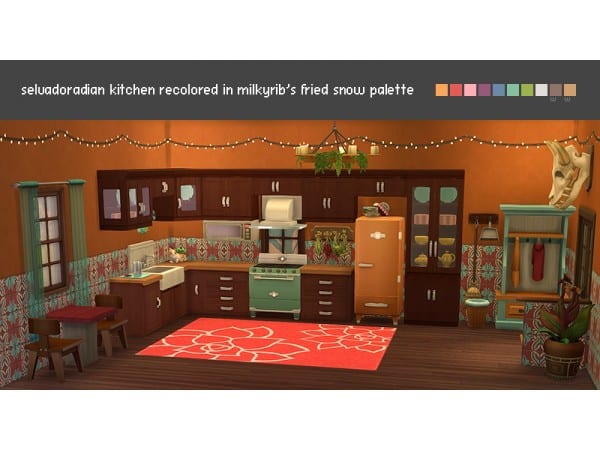
Alphacc Elegance: June N4’s Ultimate Guide to Kitchen & Dining Decor Essentials
ERROR: OpenAI API error (code 429) – 429 You exceeded your current quota, please check your plan and billing details. For more information on this error, read the docs: https://platform.openai.com/docs/guides/error-codes/api-errors.
ERROR: OpenAI API error (code 429) – 429 You exceeded your current quota, please check your plan and billing details. For more information on this error, read the docs: https://platform.openai.com/docs/guides/error-codes/api-errors.
ERROR: OpenAI API error (code 429) – 429 You exceeded your current quota, please check your plan and billing details. For more information on this error, read the docs: https://platform.openai.com/docs/guides/error-codes/api-errors.
ERROR: OpenAI API error (code 429) – 429 You exceeded your current quota, please check your plan and billing details. For more information on this error, read the docs: https://platform.openai.com/docs/guides/error-codes/api-errors.
ERROR: OpenAI API error (code 429) – 429 You exceeded your current quota, please check your plan and billing details. For more information on this error, read the docs: https://platform.openai.com/docs/guides/error-codes/api-errors.
ERROR: OpenAI API error (code 429) – 429 You exceeded your current quota, please check your plan and billing details. For more information on this error, read the docs: https://platform.openai.com/docs/guides/error-codes/api-errors.
ERROR: OpenAI API error (code 429) – 429 You exceeded your current quota, please check your plan and billing details. For more information on this error, read the docs: https://platform.openai.com/docs/guides/error-codes/api-errors.
ERROR: OpenAI API error (code 429) – 429 You exceeded your current quota, please check your plan and billing details. For more information on this error, read the docs: https://platform.openai.com/docs/guides/error-codes/api-errors.
ERROR: OpenAI API error (code 429) – 429 You exceeded your current quota, please check your plan and billing details. For more information on this error, read the docs: https://platform.openai.com/docs/guides/error-codes/api-errors.
ERROR: OpenAI API error (code 429) – 429 You exceeded your current quota, please check your plan and billing details. For more information on this error, read the docs: https://platform.openai.com/docs/guides/error-codes/api-errors.
ERROR: OpenAI API error (code 429) – 429 You exceeded your current quota, please check your plan and billing details. For more information on this error, read the docs: https://platform.openai.com/docs/guides/error-codes/api-errors.
ERROR: OpenAI API error (code 429) – 429 You exceeded your current quota, please check your plan and billing details. For more information on this error, read the docs: https://platform.openai.com/docs/guides/error-codes/api-errors.
ERROR: OpenAI API error (code 429) – 429 You exceeded your current quota, please check your plan and billing details. For more information on this error, read the docs: https://platform.openai.com/docs/guides/error-codes/api-errors.
ERROR: OpenAI API error (code 429) – 429 You exceeded your current quota, please check your plan and billing details. For more information on this error, read the docs: https://platform.openai.com/docs/guides/error-codes/api-errors.
ERROR: OpenAI API error (code 429) – 429 You exceeded your current quota, please check your plan and billing details. For more information on this error, read the docs: https://platform.openai.com/docs/guides/error-codes/api-errors.
ERROR: OpenAI API error (code 429) – 429 You exceeded your current quota, please check your plan and billing details. For more information on this error, read the docs: https://platform.openai.com/docs/guides/error-codes/api-errors.
ERROR: OpenAI API error (code 429) – 429 You exceeded your current quota, please check your plan and billing details. For more information on this error, read the docs: https://platform.openai.com/docs/guides/error-codes/api-errors.
ERROR: OpenAI API error (code 429) – 429 You exceeded your current quota, please check your plan and billing details. For more information on this error, read the docs: https://platform.openai.com/docs/guides/error-codes/api-errors.
ERROR: OpenAI API error (code 429) – 429 You exceeded your current quota, please check your plan and billing details. For more information on this error, read the docs: https://platform.openai.com/docs/guides/error-codes/api-errors.
ERROR: OpenAI API error (code 429) – 429 You exceeded your current quota, please check your plan and billing details. For more information on this error, read the docs: https://platform.openai.com/docs/guides/error-codes/api-errors.
ERROR: OpenAI API error (code 429) – 429 You exceeded your current quota, please check your plan and billing details. For more information on this error, read the docs: https://platform.openai.com/docs/guides/error-codes/api-errors.
ERROR: OpenAI API error (code 429) – 429 You exceeded your current quota, please check your plan and billing details. For more information on this error, read the docs: https://platform.openai.com/docs/guides/error-codes/api-errors.
ERROR: OpenAI API error (code 429) – 429 You exceeded your current quota, please check your plan and billing details. For more information on this error, read the docs: https://platform.openai.com/docs/guides/error-codes/api-errors.
ERROR: OpenAI API error (code 429) – 429 You exceeded your current quota, please check your plan and billing details. For more information on this error, read the docs: https://platform.openai.com/docs/guides/error-codes/api-errors.